



TAC HRTAC HR
Field attendance

Mobile Geofence Attendance and Field Rep Tracking in One System

An employee records attendance from the mobile app when they are inside the geofence of their work location, and the system verifies the location before accepting the punch. A field rep's customer visits are recorded with location proof, and the supervisor follows them from one dashboard. In TAC HR, both come together with payroll in one system.

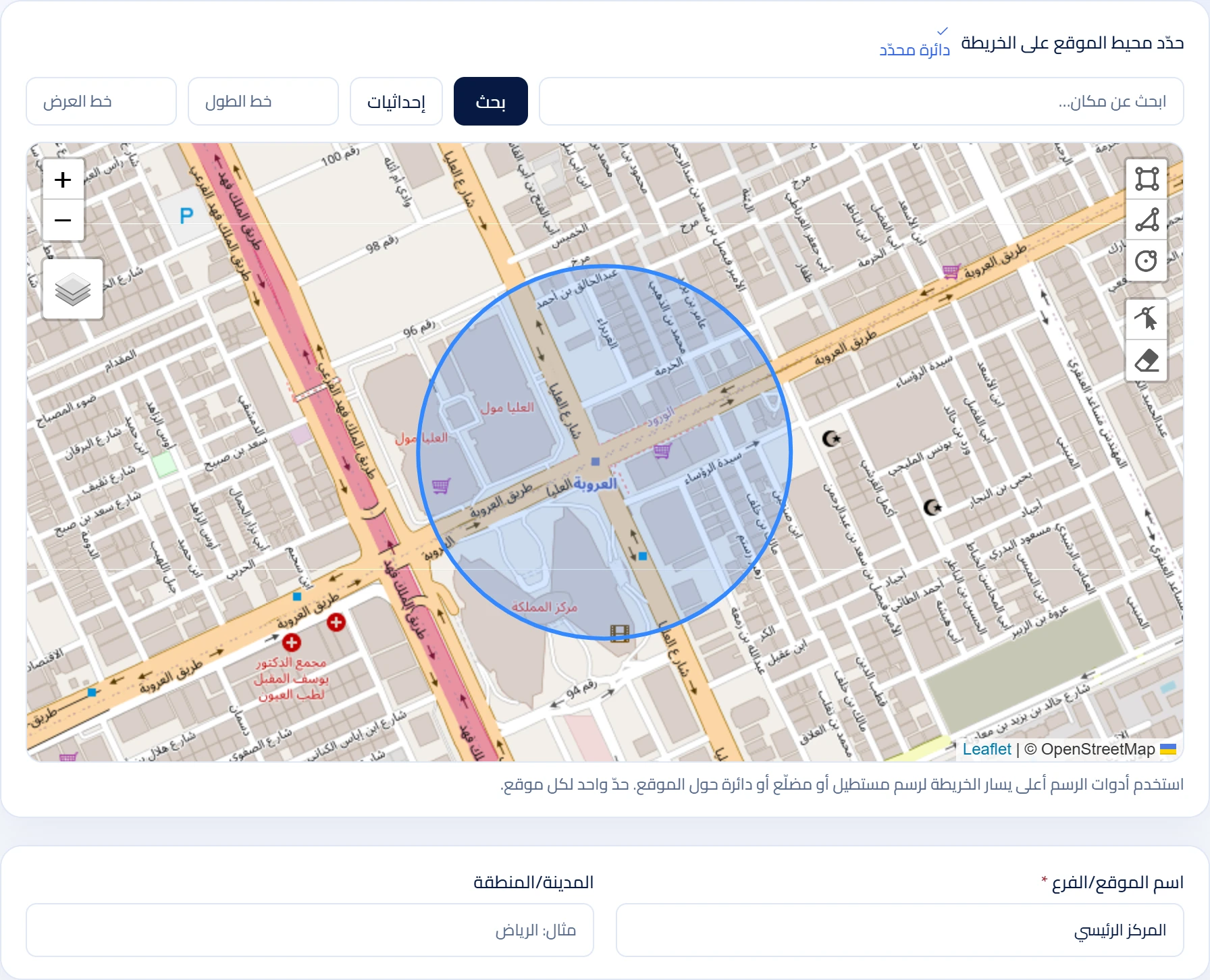
Real screenshot of the TAC HR site settings: the map and the punch geofence boundary
01

How does geofence attendance work?

The establishment sets a geofence on the map for each work location. At punch time, the app sends the phone's location and the system compares it with the geofence of the location assigned to the employee. If the location is inside the geofence the punch is accepted, and if not it is not recorded.

01

Why is verification done in the system?

If verification were done in the app alone, what the device sends could be tampered with. So the system re-checks and decides to accept or reject, and keeps a log of rejected attempts that management reviews on the web.

02

Binding the device to the employee

An employee's account is bound to one device. If they sign in on a new device they are blocked from signing in and shown a dialog to send a request to management, so no punch is recorded from a device management has not approved.

03

Rejecting fake locations

The system rejects the punch when it detects that the device location comes from a mock location provider, or that a mock location app is enabled in developer options, and it records the attempt in the log.

04

Work periods

An employee can have more than one work period in a day, and the system calculates lateness, early departure and partial absence for each period.

05

Fingerprint terminals for branches

For branches whose employees do not have suitable phones, fingerprint terminals compatible with the ADMS protocol, such as ZKTeco devices, are a good fit. They connect to the system and their punches reach the same record that mobile punches reach, so all attendance comes together in one place.

02

What is the difference between an office employee and a field rep?

Office employeeField rep
Place of workA fixed site or branchAt customers, on the move
Proof of attendanceA punch inside the site geofenceStarting and ending the work day from the phone
What is followedAttendance, lateness, departureVisits, route, customers
Followed byThe employee's manager and HRThe supervisor on the field dashboard

A rep is a regular employee in the system, and their field tracking is turned on with a switch in their file, so their attendance, payroll and requests stay in the same file.

03

How are a rep's visits tracked?

When the rep arrives at a customer they log the visit check-in, and the system verifies they are within the customer's geofence. The radius of the visit geofence can be set from 20 to 2,000 meters depending on the nature of the work. At the end they log the check-out, so every visit has a check-in time, a check-out time and a location.

  • Customer accounts and contacts: kept in the system and linked to visits.
  • Live map: shows reps' locations during the work day.
  • Routes: shows the rep's route for the day.
  • Geofences: defined for areas and customers.

Details are on the field rep tracking page.

04

Supervisor dashboard

The supervisor sees their team's reps, visits and routes from one dashboard, so they know who has started their day, who visited which customer and who has not started yet. See the field supervisor dashboard.

05

Privacy: when is location tracked?

The employee is asked to consent to location tracking during work hours before starting their field work day, and the field work day does not start without it.

06

How do I set up the geofence?

The steps to define it on the map, set the radius and assign the location to employees are in the geofence attendance setup guide.

07

What does management see?

On the web, management sees attendance records by employee, day and location, with the lateness, early departure and partial absence calculated for each work period. Rejected attempts and their reason also appear, such as a punch outside the geofence, from an unapproved device or with a fake location, so management knows what happened without relying on the employee's account alone.

Which establishments is this approach suited to?

  • An establishment with more than one branch, each with its own geofence and employees.
  • An establishment whose employees move between work sites or customers.
  • An establishment that wants to combine mobile punches and fingerprint terminals in one record.
  • A field sales, distribution or maintenance team that needs proof of its visits.

How do you start?

  1. Define the locations and geofences.
  2. Assign each employee their location and work period.
  3. Employees install the mobile app and sign in with their accounts.
  4. For those who work in the field, turn on field tracking in their file and define their customers.
  5. Review attendance and visits on the web, and the results flow into payroll.
08

One system for attendance and reps

Attendance details and settings are in the attendance service, and visit follow-up and the map in the field rep tracking service. The system isolates each establishment's data and supports multiple companies and branches.

09

Frequently asked questions

Does the employee need internet to punch?

Yes. Punching requires an internet connection because the system is what verifies the location, and there is no offline attendance recording.

What happens if the employee is outside the geofence?

The punch is not accepted and it is recorded as rejected. Management sees the rejected attempts on the web, and they do not appear to the employee in the mobile app.

Can an employee record attendance on a colleague's phone?

The account is bound to one device, and signing in on a new device is blocked until management approves a device change request.

Does the app work in languages other than Arabic?

Yes. The mobile app has four languages: Arabic, English, Urdu and Hindi, while the web admin interface is in Arabic only.

How does attendance relate to payroll?

Attendance results such as lateness, early departure and absence flow into the monthly payroll, so they are not re-entered by hand.

Can mobile and fingerprint terminals be combined?

Yes. A branch can use a fingerprint terminal and phones, and the punches come together in one record.

Show us how you work, and we'll show you the difference.

In the demo we walk through a full day in your company: the morning punch, a request, the month's payroll, and the rep in the field, on data like yours.