TAC HRTAC HR
A manager in a Riyadh office walking an employee through a chart on her laptop while he takes notes in a performance review
Talent and culture

A performance review system with weighted criteria and a result whose every point has a known source

A review cycle with your own criteria and weights, in which the system combines reviewers' scores, goal achievement, the self review and the 360 review at weights you set, then calibrates, approves and delivers the result to the employee's app. From there come improvement plans with tasks, raise and bonus proposals, and training courses with lessons and quizzes.

Before

What happens today without this service

  • 01Each manager scores on their own scale in a separate file, one strict and another lenient, and nobody knows how the final score came out
  • 02An employee's probation ends before anyone asks for a review, so they are confirmed or let go without a form or evidence
  • 03The result is discussed with the employee verbally, then there is no record of what was agreed and no proof they saw the result
  • 04A raise or bonus after the review is tracked in a side sheet and typed into payroll by hand, with nothing tying it to the result
Capabilities

Exactly what this service does

  • Weighted criteria and scales

    Each criterion has its weight and scale: 1 to 5, 1 to 10, yes or no, multiple choice, or goals, which are calculated rather than filled in.

  • Five ready templates

    General employee, manager, sales, operations and field, and end of probation, each with its criteria, groups and weights.

  • Reviewers by relationship

    Direct manager, peer, HR and senior management, or the manager's manager, with an automatic reminder for anyone running late.

  • Self review and 360

    The employee reviews themselves from the phone at up to 50% weight, and an anonymous 360 review at up to 30% is hidden below three reviewers.

  • Calibration with a written reason

    Each reviewer's deviation from the cycle average is visible, and a final score can be changed only with a reason kept in the calibration log.

  • Goals and check-ins

    Goals with weighted key results, and a regular check-in between manager and employee every three months by default, acknowledged by the employee.

  • Minutes and improvement plans

    Minutes with strengths and areas to improve signed by the employee with their name, and an improvement plan with tasks, a period and a final decision.

  • Proposed raises and bonuses

    From the approved result an amount is proposed above a threshold you set, and only what a payroll permission holder approves enters payroll.

  • Learning and skills

    Courses with text, image, video, file and quiz lessons, career paths, skills from 1 to 5, budgeted plans and a completion certificate.

Inside the service

How it actually works in your company

A performance review loses its value when nobody knows how the score came about. This service builds the result from named parts: reviewers' scores on weighted criteria, the employee's goal achievement, their self review and the anonymous 360 review, each at a weight your company sets before the cycle starts. Then comes a calibration session with written reasons, approval, and the result reaching the employee in the app for acknowledgement. What follows the result belongs to the same service: meeting minutes the employee signs, an improvement plan for whoever needs one, a raise or bonus proposal for whoever reaches the threshold, and training courses that raise skills in the employee's file.

01

The review cycle, from criteria to deadline

A cycle starts with its title, deadline, employees and reviewers, and each reviewer has a relationship: direct manager, peer, HR and senior management, or the manager's manager. Criteria are written by hand or start from one of five ready templates, such as «Sales» with «Meeting the sales target» weighted 25, or «Operations and field» with «Following safety requirements» weighted 25. Each criterion has its scale: 1 to 5, 1 to 10, yes or no, multiple choice, or the «Goals» criterion that nobody fills in because it is calculated from the employee's achievement. A reviewer who is running late is reminded automatically before the deadline at the automation intervals, which default to 7 days, then 3, then 1, or by hand from the cycle page once a day.

02

How the final score is built

The result is calculated in published steps. Take a distribution company in Jeddah: an employee whose reviewers average 80, with 70% goal achievement and the goals criterion weighted 20% of the cycle, scores 78. Their self review of 90 is then blended with the same goals to become 86, and at a self-review weight of 20% the result comes out at 80, in the «Strong performance» band. Had they not submitted the self review it would stay 78 with a note telling them why, and for someone with no goals the goals weight is spread over the other criteria, again with a note. The 360 review enters at its weight of up to 30%, and neither its score nor its comments appear until it has three reviewers, with comments sorted alphabetically so the writer cannot be inferred. The bands are: outstanding from 90, strong from 75, and meets expectations from 60.

03

Calibration, approval and the employee's acknowledgement

On the «Score calibration» screen, the permission holder sees for every reviewer the number of reviews, their average and the deviation from the cycle average: more than 10 points above flags the reviewer as lenient, and 10 points below as strict. The flag is an indicator, not a verdict: changing an employee's final score is a human decision that is not accepted without a written reason, and it is kept in the calibration log with the score before and after. In the «Cycle summary», the actual spread of scores across the bands is compared with a target curve your company sets if it wants one. After approval calibration locks, the result reaches the employee in the app, and they choose «I have read it» or «I have a reservation» with a required note, once. A reservation reaches the cycle's creator, and acknowledging means having seen the result, not agreeing with it.

04

After the result: minutes, a plan and money

The reviewer writes the review meeting minutes with strengths, areas to improve and up to eight development goals, then shares them, and the employee confirms receipt in the app by typing their name, after which the minutes lock. Whoever needs to improve gets a plan with a period, written expectations and dated tasks created as a list in «Task management» if you subscribe to it, its owner is reminded three days before it ends, and it closes with a decision: passed, extended, not passed or cancelled, where «not passed» is a proposal awaiting HR, not an automatic action. Raises have a setting that is off by default, with a threshold of 90 and a rate of 5%: a basic salary of 6,000 and a score of 92 propose a raise of 300 that takes effect on the first of the next month once approved. An approved bonus enters the first payroll run as a separate line, and the basic salary never changes silently.

05

Probation, learning and career paths

Every day the system looks for anyone whose probation ends within 14 days and creates a review on the «End of probation» template, filled in by the direct manager and due two days before the end. It carries a «Decision: confirm the employee?» criterion answered yes or no at zero weight, so it never changes the score: yes proposes confirmation and no proposes termination, the decision belongs to HR, and the actual termination is done in the final settlement by HR's own hand. Learning covers internal, external and e-learning courses with sessions, seats and a seat cost fixed at enrolment. A lesson is a series of blocks, text, image, video, file and quiz, graded instantly, with a default pass mark of 60%. Passing a course issues a certificate saved in the employee's documents, raises the course's skills in their file, and moves them along their career path, which suggests their next course.


Inside the product

The screen as your team uses it

Performance and development
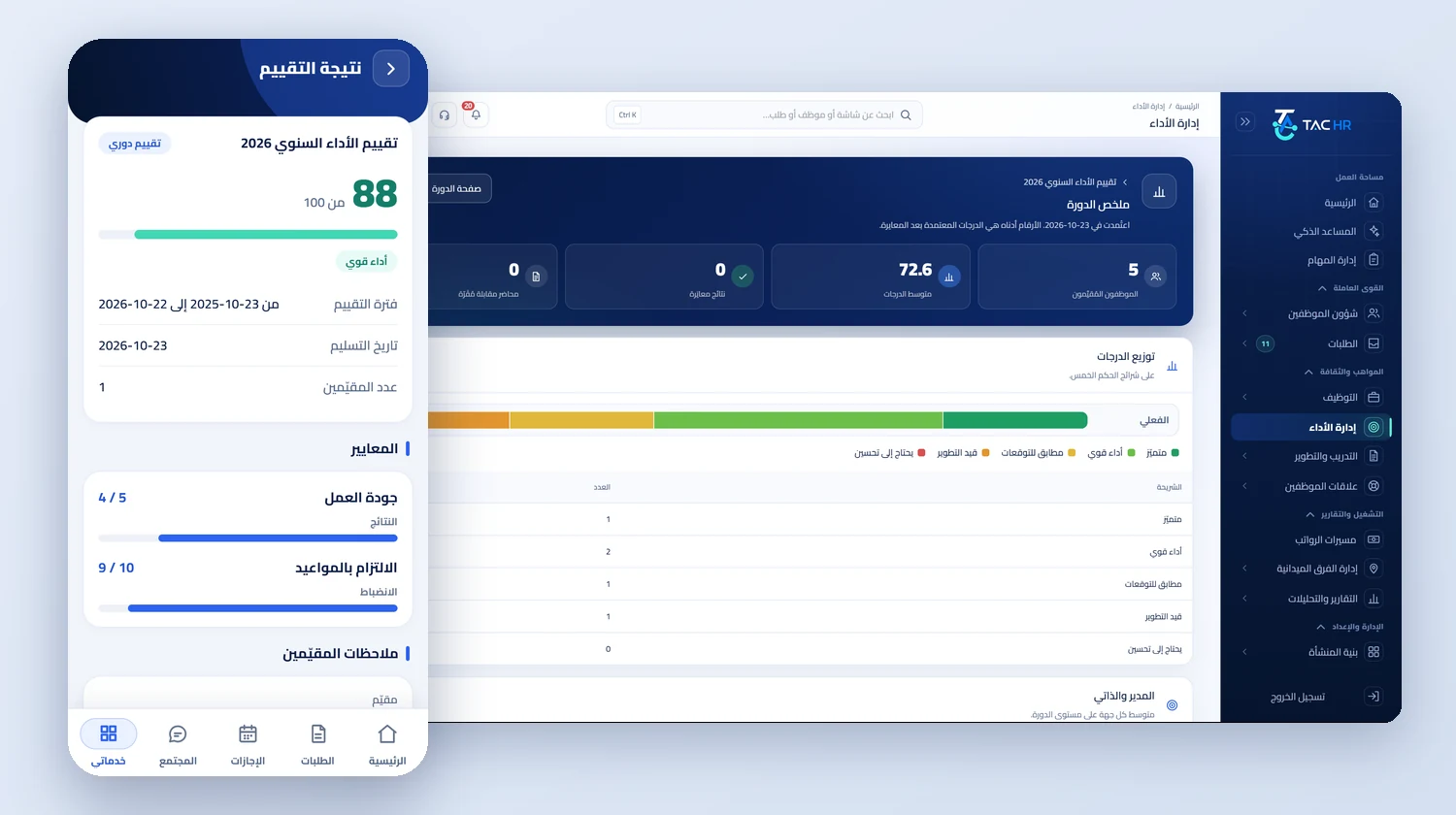
The cycle summary of the «Annual performance review 2026» with the number of employees reviewed, the average score and the actual score distribution across the five bands with a table of their counts, next to the «Review result» screen of the employee app with a score of 88 out of 100 and the score of each criterion
From the phone

One employee app opens all of this

The employee reviews themselves from the phone, updates progress on their goals if you allow it, reads and acknowledges their result, signs the review meeting minutes, and works through course lessons and their quizzes. They have no web account, and the app is their way in.

  • A four-language interface: Arabic, English, Urdu and Hindi
  • Performance and training screens appear only when the company subscribes to the service
  • Phone notifications when a review cycle starts, a result is published, minutes are shared and a course is due
See the employee app

What the app opens for the employee

From the phone, in the performance and development service

  • Review result
  • Self review
  • My goals
  • Meeting minutes
  • 360 review
  • Training
The flow

How the process runs end to end

  1. 01

    Set up

    The cycle's criteria, weights and scales, the reviewers and their relationship, the self and 360 weights and the deadline

  2. 02

    Review

    Reviewers fill in, the employee reviews themselves from the phone, and anyone late is reminded before the deadline

  3. 03

    Calibrate

    Every reviewer's deviation is visible, each change carries a written reason, then approval locks the results

  4. 04

    Follow up

    Acknowledgement, review minutes, improvement plan, raise or bonus proposal, and training

After rollout

What actually changes

Every figure in this section is a setting or a limit configured in the system. The effect on your company is something you measure after rollout.

10 points
Whoever calibrates knows which reviewer is lenient and which is strict, since the flag appears once a reviewer's average moves more than 10 points from the cycle average
14 days
No probation ends without a review: the form is created automatically 14 days before and is due two days before the end
3 reviewers
Colleagues write the 360 review freely, because neither its score nor its comments appear until there are three reviewers
3 months
The manager meets the employee on their goals in a check-in every 3 months by default, which your company can set from 1 to 12 months
300 riyals
The raise proposal arrives with its amount: a basic of 6,000 and a score of 92 at 5% propose 300 riyals awaiting approval
60%
The employee takes a lesson quiz on the phone and sees the result at once, with a default pass mark of 60% set per quiz

Limits of this service

The system never terminates, confirms or raises pay on its own: everything that comes out of a review is a proposal a person approves, and raises and bonuses need the payroll permission. A cycle's results cannot be changed after approval. Violations, warnings and the penalty ladder belong to the employee requests service, not to this one. Improvement plan tasks are created as a list only for companies subscribed to task management; otherwise the plan stays a period, expectations and a decision. Signing the minutes means typing a name in the app, not a certified electronic signature. Lesson videos are embedded from YouTube, while images and files are uploaded to the platform.

Try performance and development on your own team

We build the demo on a review cycle with your criteria and weights, and show the result from the manager's review to the employee's acknowledgement in the app.