TAC HRTAC HR
An employee holding a smartphone in an office building lobby with an ID badge on a lanyard
For employees and reps

One app on the employee's phone that opens everything their company subscribed to, and a little more for the field rep

The employee punches from the phone, files requests and follows them, opens the payslip, and sees pending acknowledgements and tasks, in four languages and light or dark mode. The field rep gets the same app with customer, visit and zone screens. The app runs on Android, and the iPhone version is coming soon on the App Store.

Before the app

What happens today without an employee app

  • 01The employee keeps asking: where is my request, how much leave do I have left, what is my net pay, and finds the answer only at HR
  • 02Punches are recorded from anywhere and from a colleague's phone, so the manager does not trust what the attendance sheet shows
  • 03The payslip is a paper or a picture in a chat group, and warnings and custody acknowledgements get lost between messages so nobody knows who read and who acknowledged
  • 04Your employees come from different nationalities and languages, and some cannot follow a form or a message written in a single language
What it does

Exactly what your employee does from the phone

  • A punch from one circle

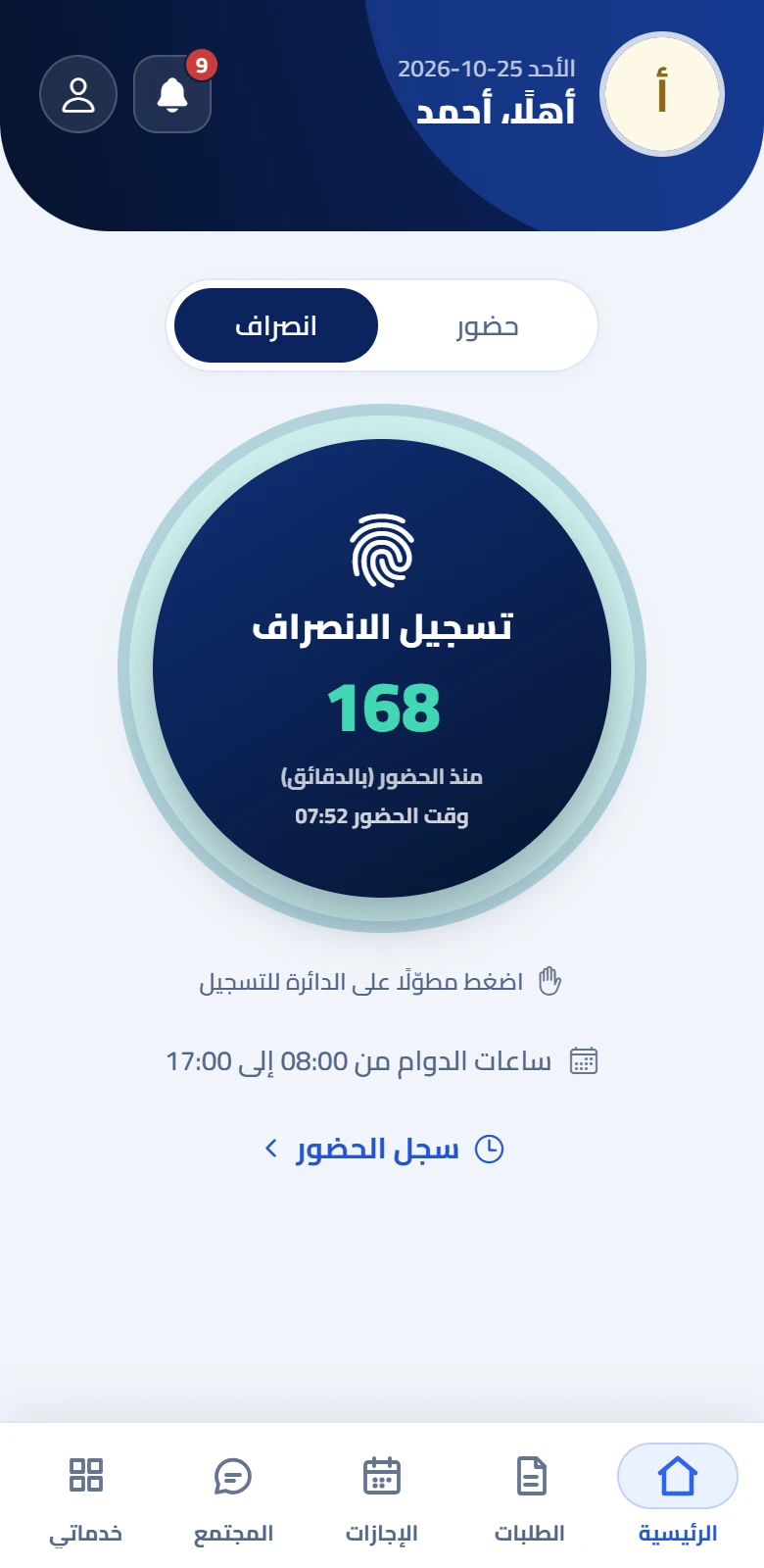
    The employee presses and holds the home circle to record arrival or departure, and sees how many minutes since they started, their working hours and their attendance log.

  • Requests with their status

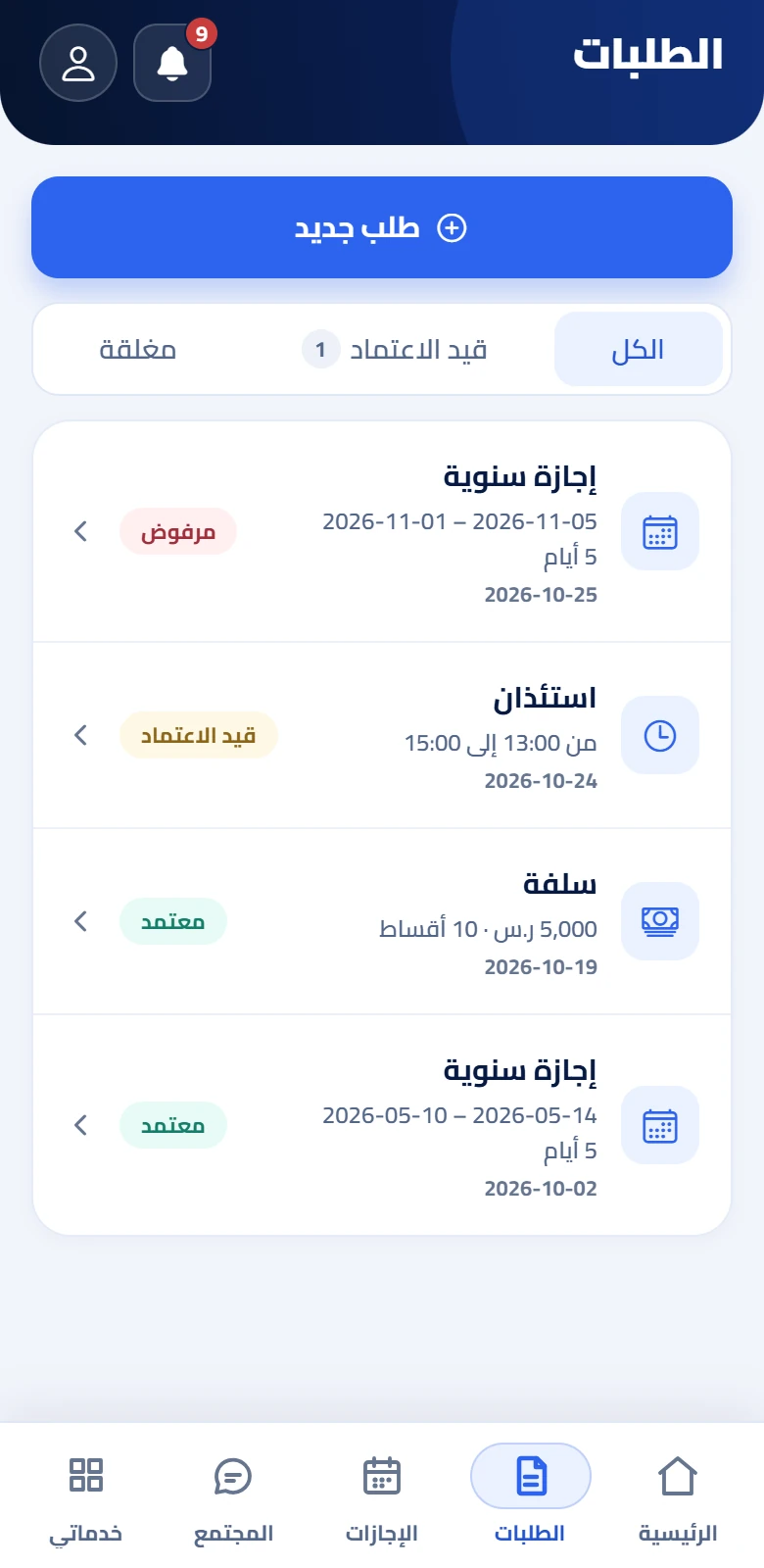
    Leave, permission, an advance and more in one form, with the request followed as pending, approved or rejected, and a chat with management inside the request itself.

  • Leave balance

    For each leave type its entitled, taken, reserved-for-pending-requests and available balance, with the figures coming from the system and not from arithmetic on the phone.

  • The payslip

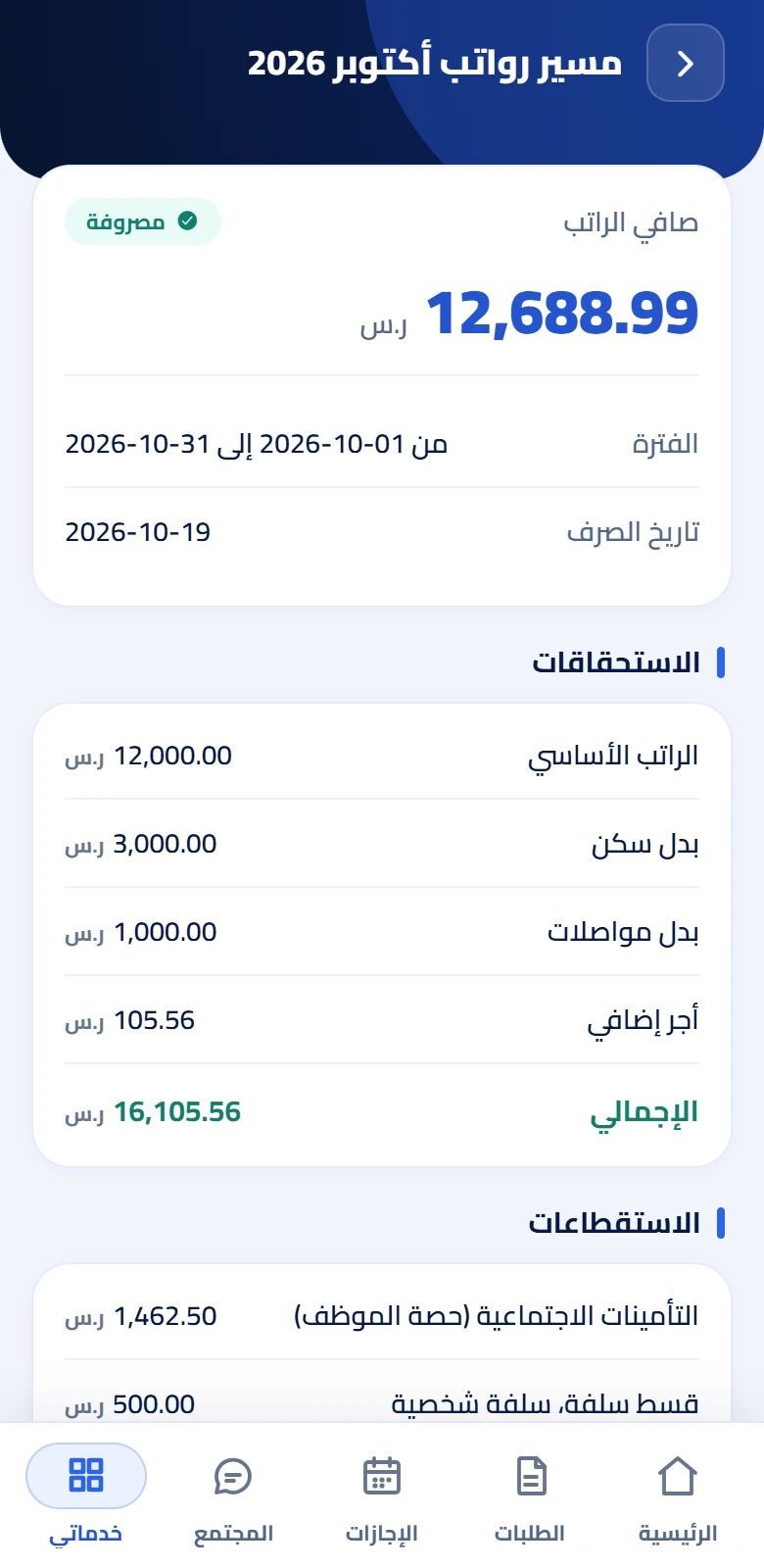
    The latest pay and its items of earnings and deductions, the payslips of earlier months, and a button that opens the payslip file as a PDF or shares it.

  • Required actions

    One screen gathering what waits for the employee: a warning or circular awaiting acknowledgement, an open survey, a self review, a course they are nominated for, and an attendance day that needs an explanation.

  • Tasks and documents

    Their tasks from company lists, completed with one step, their documents with their validity status, and uploading a document or updating their file through a request that management approves.

  • Performance and training

    The review result, which they acknowledge, their self review, goals and interview minutes, and their courses with lessons, quizzes and a completion certificate they download and share.

  • Acknowledgements, grievances and surveys

    Acknowledging warnings and circulars, receiving and returning custody, a grievance with a conversation with the officer, and surveys with eight question types.

  • Community, announcements and notifications

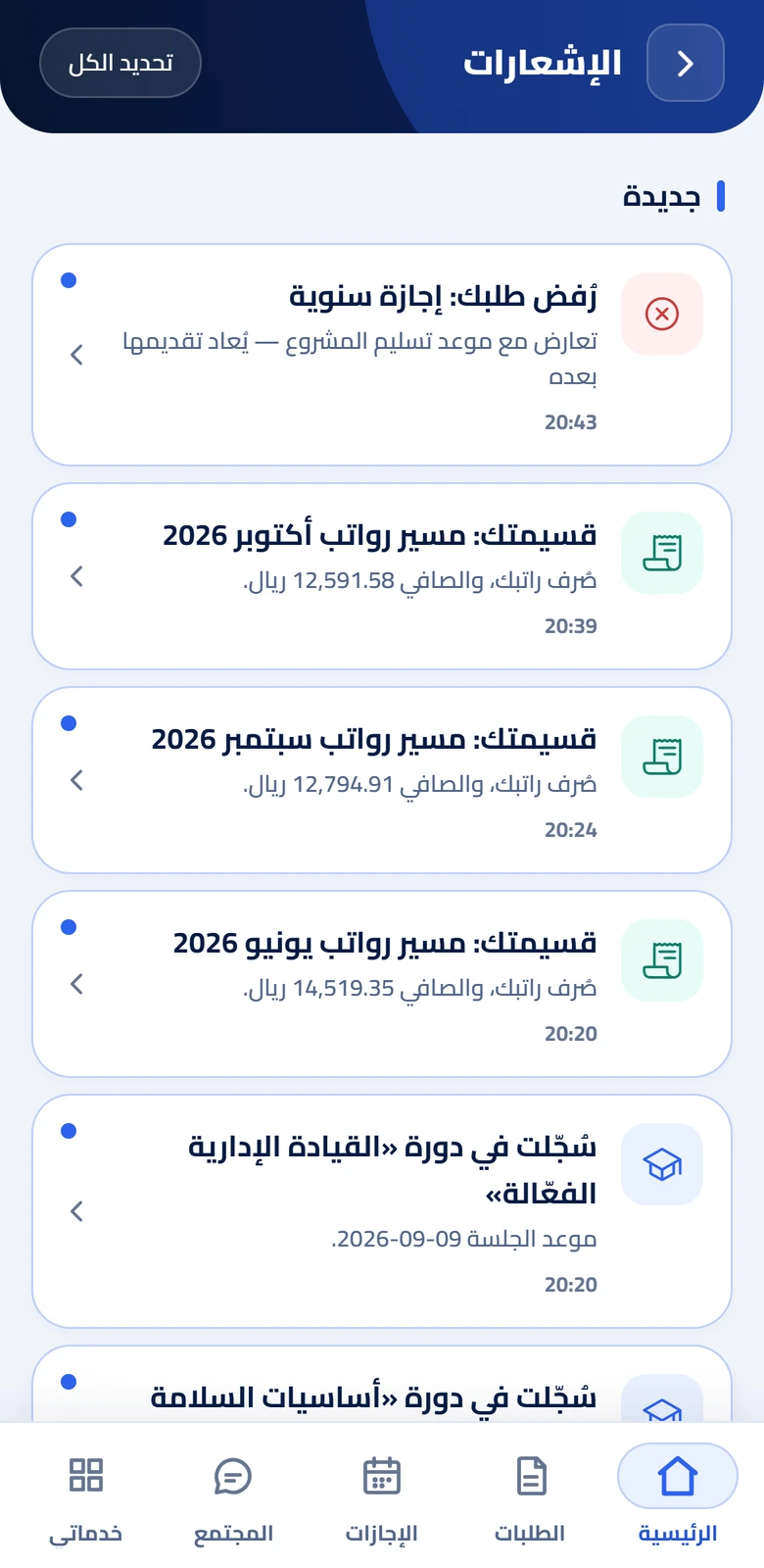
    A feed of management posts with likes and comments, company announcements, and notifications that reach the phone as they happen and open the relevant screen when tapped.

Inside the app

How the app actually works in your employee's hand

The app is your employee's only door into TAC HR: there is no web portal for the employee, and the web is for management. It is one app, not two: at sign-in the system decides whether the account is an employee or a rep, and the app builds its bar and screens from what the account holds. What appears in it follows what the employer subscribed to, so an employee of a company that did not subscribe to payroll sees no payslip, and one whose company did not subscribe to performance sees no review. Between the screens and the notifications the employee's actions reach their pocket, in the language they chose, so they never have to ask anyone to know where they stand.

01

One app, two modes

The employee sees a bar of five tabs: Home, Requests, Leaves, Community and My services, and each tab appears only if the company holds its capability. «My services» is a grid in three groups, «My requests and documents», «Performance and communication» and «Support», holding payslips, documents, custody, warnings, tasks, performance, self review, goals, training, announcements, surveys, grievances and medical insurance. The rep gets the same bar and adds a «Field» section in «My services» and a row of cards under the home circle. The rep is a fully ordinary employee, and the system decides their mode from a setting on their file. Every screen follows its service: leave, warnings, grievances and the community with «Employee requests», payslips with «Payroll», documents with «Archiving», and performance and training with «Performance and development».

02

Attendance: a punch that always needs the internet

A punch is recorded by pressing and holding the circle, and it needs location permission and an internet connection at all times: there is no queue of punches and no later logging, so if the connection drops the punch is not recorded. If the company requires fingerprint or face verification, the app asks the system for a one-time challenge valid for 5 minutes, the phone verifies its owner, and the proof is sent with the punch. Before every punch the app checks the device: a USB cable, debugging and developer options, an emulator, a mock location provider and its apps and known fake-location packages, a rooted phone, and a gap between the satellite and network locations. Whoever grants approximate location alone on Android is blocked with a message asking for precise location.

03

An account bound to a device

The employee's account is bound to their phone at first sign-in, and the binding is strict by default. Whoever signs in on another phone is blocked and shown a dialog that sends a device-change request to management to approve or refuse, and sees «Awaiting management approval» until the request is decided. The employee signs in with a phone number or email and a password. If the password must be changed at first sign-in, its screen is forced before any other. An employee with a warning awaiting acknowledgement finds the secondary services held back until they acknowledge, so they cannot skip what is required of them, while punching and the attendance log stay open and are never held back.

04

Requests, leave and pay

The employee files a request in one form whose fields change with the request type, and the app lists up to 31 built-in types with any your company defines added, and the company controls which appear. A leave opens by its type from the Leaves tab, where each type shows its entitled, taken, reserved and available balance. The employee follows the request through its stages and decision and can withdraw it, chats with management with attachments inside it, and confirms an early departure from a dialog inside the app. After pay is released a notification arrives, and the payslip screen details net pay, the period, the pay date, earnings and deductions, then opens its file or shares it as a PDF.

05

The field rep on the same app

A rep's punch is starting and ending the field shift, preceded by tracking setup: location permission all the time and a battery exemption, consent to tracking the first time, and fingerprint or face verification if the company requires it. Under the circle sits a row of cards for customers, visits, field tasks and «Day summary», and «My zones» in «My services». The rep records a visit with their location and photos, and sees distance, visits and tracking time on a route map in the day summary. If the internet drops the app keeps up to 3000 tracking points and sends them later, and if the rep moves more than 500 meters outside their zone for over 10 minutes during the shift, a notification arrives on their device.


Inside the product

The screens as your employee sees them

  • Home screen of the TAC HR app: the punch-out circle, minutes since check-in, working hours and the attendance log
    Home
  • Requests screen of the TAC HR app: the «New request» button, a rejected leave, a pending permission, an approved advance and an approved leave
    Requests
  • Payslip screen of the TAC HR app: October 2026 net pay, the period, the pay date, earnings and deductions
    Payslip
  • Notifications screen of the TAC HR app: newest on top, a rejected leave request, payslips and course enrolments
    Notifications
The flow

How an employee starts and carries on

  1. 01

    Sign in and bind the device

    The employee signs in with a phone number or email and a password, the account is bound to their phone and the system decides their mode as employee or rep

  2. 02

    Your company's tabs

    The app builds its bar and screens from the services subscribed to, so the employee sees nothing their company did not subscribe to

  3. 03

    Daily work

    They punch, file and follow requests, open the payslip, complete tasks and acknowledge what is asked of them

  4. 04

    Notification and update

    Notifications arrive as they happen, the app updates with signed releases, and may require an update before carrying on

In figures

What is in the app, in numbers

Every figure in this section is a setting or a limit configured in the app or the system. The effect of the app on your company is something you measure after rollout.

61 screens
The app holds attendance, requests, leave, pay, tasks, performance, training, acknowledgement and field screens, and shows those your company subscribed to
4 languages
The app interface runs in Arabic, English, Urdu and Hindi, and the employee picks their language from the language screen
5 minutes
The fingerprint or face verification challenge stays valid for this long, once and for one device, so it cannot be reused or serve anyone else
31 types
The new-request screen lists this many built-in types, adds those your company defines, and the company decides which appear
8 types
The employee answers a survey with questions of eight types: single choice, multiple choice, yes or no, scale, ranking, date, number and text
3000 points
The app keeps this many of the rep's tracking points when the internet drops and sends them on return, without duplicating a point or losing one

Limits of the app

A punch always needs an internet connection, so there is no punching without a network and no later logging, and only field tracking stores its points through a drop. There is no web portal for the employee: the app is their only door. Approximate-location detection works on Android only for now, and the iPhone version is coming soon on the App Store. The app's screens follow the services subscribed to, so a service your company did not subscribe to shows no screen. Acknowledging the review interview minutes is done by typing one's name in the app, not a certified electronic signature. A version older than the minimum is held behind a screen asking for an update until it is updated.

Try the app on your own employees

We tailor the demo to your company's services and show what the employee and the field rep see on their phones, from the punch to the payslip.