TAC HRTAC HR
An accountant reviewing printed statements beside her laptop
By your role in the company

TAC HR for Finance: A Payroll You Review Line by Line Before Approval

A run with separate lines for every employee, GOSI under both systems, and a wage file and journal entry that come out of the approved run itself

Finance's work in payroll is review, then approval, then the entry. In TAC HR the run reaches you with separate lines for each employee, each with its formula, so you review every figure at its source, then export the wage protection file and the journal entry from the approved run itself with no re-keying.

Today's reality

What happens in finance without one payroll

  • 01Overtime and lateness are worked out in an outside sheet with a formula only its author understands, so the figure changes each month with whoever computes it
  • 02The GOSI rate changes for people who joined after July 2024, and the old sheet applies one rate to everyone, so the difference piles up
  • 03The wage file goes out with an IBAN missing a digit or a wrong ID, the salary bounces, and the error surfaces after pay day
  • 04Journal entries are built by hand from attendance, payroll and loan sheets, so they come late and do not match what was paid
  • 05An employee's pay is changed retroactively on a month already paid, and nobody knows where the difference went or in which run it landed
With the platform

What changes in your financial month

  • A ready draft, not an empty run

    The month's draft is created automatically on a day the company sets, reads attendance, leave, loans and approved requests, and writes every line with its formula, so your review starts from a figure.

  • A calculation model with a basis you pick

    The Saudi labour law model with a 30-day divisor and shift hours, or a custom model with a fixed divisor or actual working days and a factor, and a basis for lateness, absence and overtime: basic, gross or components.

  • GOSI under both systems, with its cap

    The employee share and the company share are worked out by each employee's system and the period's date, the contributory wage is capped at SAR 45,000, and the company share shows as a cost that leaves net pay untouched.

  • A readiness check before the wage file

    The check shows who lacks a valid Saudi IBAN, a sound ID or the company number, so you fix the error before export, not after a salary bounces.

  • Locking and adjustments with no silent differences

    Once a day enters a run in payment, it is locked, and any later attendance correction or retroactive pay change becomes an adjustment the next run carries as a separate line.

  • The entry and payslip from the same source

    The journal entry with your account codes comes out of the approved run, and the payslip reaches the employee's phone at payment, so figures match across the run, the entry and the payslip.

Inside the platform

How the run actually passes through its stops

Pay in a Saudi company is a chain of small decisions: which days the employee is owed, on what basis lateness is deducted, where overtime comes from, and at what rate GOSI is withheld. TAC HR writes each decision as a setting in its own place, and the same engine then reads it in the run, the payslip and the report, so no figure is worked out in one place and redone in another. This page walks through the stops of your financial month, what the system works out, what stays in your hands and what it does not do, so before you start you know where you review and where you decide.

01

Setup: the model, the basis and the source

The closest setting wins, from the employee's file to their location to the company. You choose the calculation model: Saudi labour law, dividing the month by 30 and using the shift's hours, or a custom model with a fixed divisor or actual working days and a factor applied to the deduction. Lateness, absence and overtime each have their basis: basic pay, gross pay or components you pick. The overtime source is an explicit setting, with the default being what an overtime request approved, or everything past the shift's end from the attendance log. Whoever was hired or left in the period is owed in proportion to their days of service out of the model's divisor.

02

The lines: attendance, penalties and loans

The run reads lateness in minutes and multiplies the minute rate by the minutes, and works out partial absence as the day rate times the share of minutes missed from that day's schedule. The penalty table for lateness and absence is one source from which the company's policy is shown and from which the engine calculates, and the month's financial penalties never exceed five days of pay. Loans enter by instalment, each instalment with its number and due date, and postponed ones are rescheduled. The daily business trip allowance is a separate line from the approved request, and so is sick leave in its tiers of 30 days at full pay, then 60 at three quarters, then 30 unpaid, and the employee's share of medical insurance.

03

GOSI as the engine computes it

The rates sit in one table and are applied by the employee's system and the period's start date. A Saudi employee on the previous system has 9.75% withheld and the company pays 11.75%, and a Saudi employee on the new system has a pension rate that steps up every July to 11%, so the rate is 10.75% in October 2026 with the company share at 12.75%, with no one changing a setting. For non-Saudi employees only occupational hazards apply, at 2% on the company alone. The contributory wage is capped at SAR 45,000, so what is above it does not enter the deduction. The company's share shows in reports as a cost on top of pay, leaves the employee's net untouched, and is not paid by the system.

04

Approval, locking and adjustments

The run moves from draft to pending approval, approved, in payment and paid, and you choose its approval chain at creation, in sequence or in parallel. Its visibility is for all admins with the permission or only for the chain's members, its creator and the system admin, and the payment permission does not bypass it. Once a day enters a run in payment, it is locked, so an approved attendance correction after that is measured by the system before and after and the difference is carried by the next run as an adjustment line. A retroactive pay change works the same way: it is recorded with a before and after snapshot and an effective date, and the next run carries the difference. A switch to hide payslips keeps a new run's payslips hidden until you reveal them.

05

The wage file, the entry and the settlement

The wage protection file page runs a check before generation: errors block the file, such as a missing company number, a Saudi IBAN whose check digits do not match or an unsound ID, while warnings do not. The file is a detailed table that opens in Excel in Arabic. With it come a journal entry with your account codes, the monthly cost report by department or branch, and a payslip that reaches the employee's phone at payment with a notification. When an employee's service ends, the settlement works out their unpaid salary days, leave balance, the award, loans and custody, with the award being half a month for each of the first five years and a month for each year after, and prints as a document.


Inside the interface

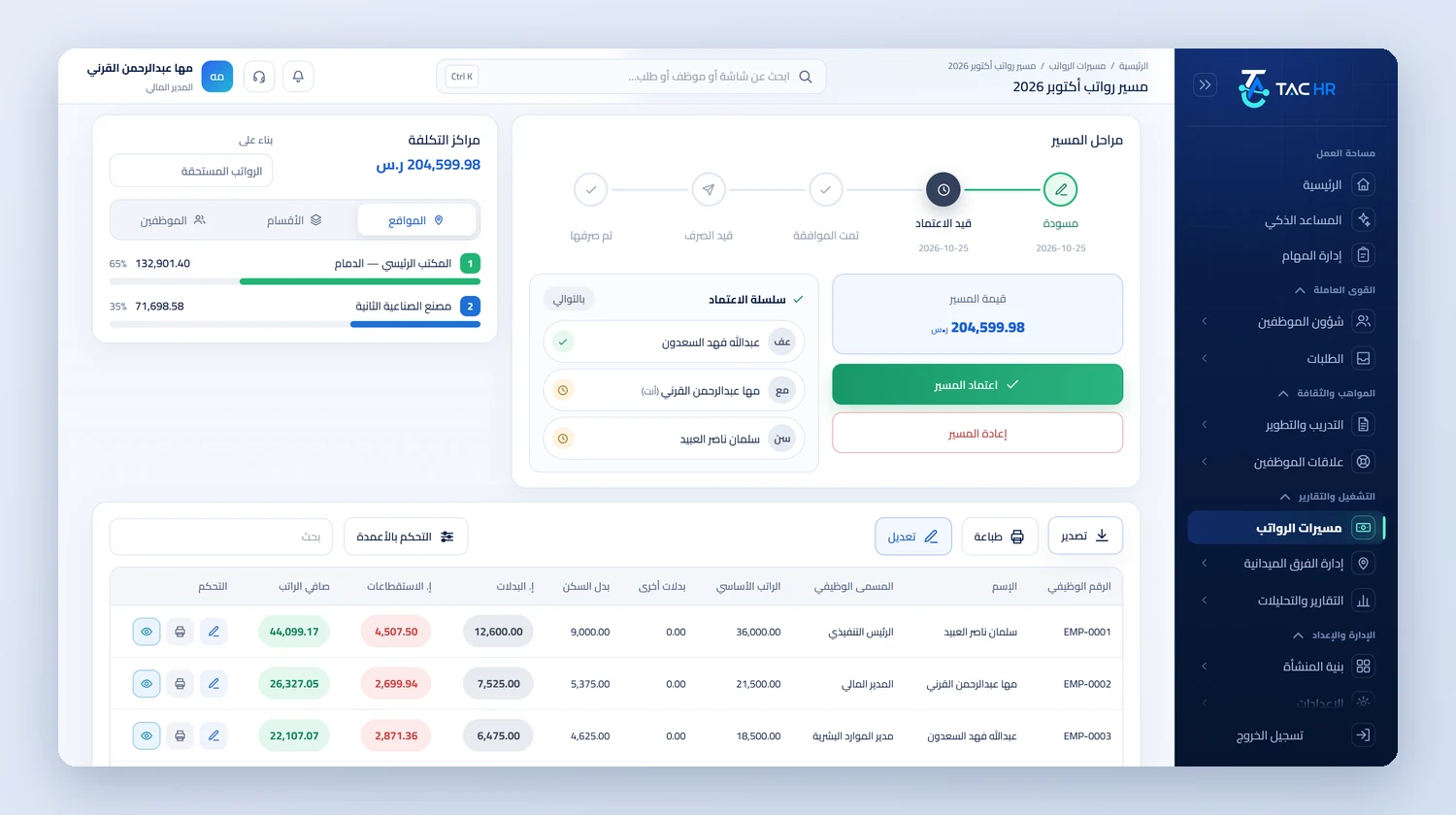
The run as you review it before approval

TAC HR for Finance: A Payroll You Review Line by Line Before Approval
The October 2026 payroll run with its stages from draft to paid, an approval chain of three approvers, the run value and the approve and return buttons, cost centers by location, and the employee table of basic pay, allowances, deductions and net salary
An operating day

How your month runs on the platform

  1. 01

    Setup

    The calculation model, deduction basis, overtime source, each employee's GOSI system, the journal accounts and the day of the automatic draft

  2. 02

    Review

    You open the draft and review each employee's lines: attendance, penalties, loans, trips and sick leave, and fix what needs fixing before approval

  3. 03

    Approval and payment

    The approval chain runs in sequence or in parallel, then payment is recorded, which locks the period and carries any later corrections forward

  4. 04

    Delivery

    The wage file is checked and exported, the journal entry and cost reports come out, and payslips reach employees' phones

The numbers

What the system works out for you

The figures come from a hypothetical example, computed by the system's own functions. The effect on your company is something you measure after rollout.

SAR 1,075.00
The GOSI share of a Saudi employee on the new system with a contributory wage of SAR 10,000 in October 2026, at 10.75%, with the company's share of SAR 1,275.00 as a cost on top of their pay
SAR 175.00
Pay for 4 overtime hours on a gross basis of SAR 7,500 and a basic of SAR 6,000, at an overtime rate of SAR 43.75 an hour shown with its formula on the payslip
SAR 880.00
An approved business trip of 4 days at a daily allowance of SAR 220, entering the run as a separate line from the approved request itself

Limits of what the platform offers finance

The wage protection file is a detailed table that comes out of the approved run after the readiness check. It is not in the Mudad format or any bank format, and it is not sent to any body. The system does not transfer salaries, so Paid is recorded by the user after payment. The company's GOSI share is calculated and shown in reports and is not paid from the system. The journal entry is an Excel file imported into the accounting software, and it does not reach it directly. Someone on the new GOSI system takes their rate from the table, so company rate overrides apply to the previous system alone.

Industry questions

What finance asks before deciding

Does the journal entry match the run?

Yes. The entry is built from the approved run itself with your company's account codes and comes out as an Excel file you import into the accounting software, so its figures match what was paid.

How do I check IBANs before uploading?

When you open the wage protection file page the system checks the Saudi IBAN and its check digits and checks the ID and the company number, and shows the check with what is missing. Errors block the file from being generated until they are fixed.

Can I see the GOSI share for each employee?

Yes, the employee share and the employer share for each employee, under their previous or new system, with the period's date and the wage cap. The company's share shows as a cost and is not paid from the system.

Does the system pay or transfer salaries?

No. The wage protection file comes out of the run as a detailed table after the check, and transferring salaries happens outside the system. Then the user records Paid, which locks the run and sends payslips to employees.

Request a demo on a run like yours

We show you the run on data that looks like your company, and start with what costs you time each month: the review, the file or the entry.