TAC HRTAC HR
A woman handing a folder to a staff member behind a service counter in a wide reception hall
Self-service

An employee request system with an approval route per request type and a leave balance checked before approval

Employees file leave, letters and administrative requests from their phones. The system checks the balance and reserves the days, then the request follows the approval route your company set for its type. Whatever falls within the auto-approval limits is approved at once, and the rest waits for the decision maker with a notification.

Before

What happens today without this service

  • 01A leave request arrives as a WhatsApp message, then gets lost between the manager and HR, and the employee never knows where it stopped
  • 02Two requests are approved against a balance that covers only one, the balance turns negative, and the argument starts after the employee has already travelled
  • 03A one-day leave goes past three approvers as if it were a resignation, because every request shares the same route
  • 04A complaint about a direct manager passes through that manager's hands, so people stop complaining and the dispute leaves no written trace
Capabilities

Exactly what this service does

  • A route per request type

    On the approval routes screen you set each type's approvers, in sequence or in parallel, plus watchers who see it without acting.

  • The direct manager as approver

    The employee's direct manager step is resolved from the requester's file at decision time, so routes need no rework after every transfer.

  • Auto-approval within limits

    A per-request limit and a monthly limit for each type, in days, minutes, amount or count, and off until you turn it on.

  • Balance reserved at filing

    A pending request reserves its days, so two requests never draw on a balance that covers one, and two leaves cannot overlap on a day.

  • Annual leave rules

    21 days rising to 30 after 60 months by default, yearly or monthly accrual, and service periods before accrual and before use.

  • Your own leave and request types

    Nine seeded leave types with their days, pay and restriction, and your company adds its own types that appear in the app.

  • Letters issued after approval

    The employment letter, the salary letter and the experience certificate are generated as files, saved to the employee's documents, and announced by notification.

  • Confidential complaints with a deadline

    Complaints hide the author of a confidential complaint in every read, and an overdue complaint is escalated once.

  • Violations, warnings and acknowledgment

    A ladder of actions built from attendance events, and a warning the employee acknowledges from the phone and can object to within a set window.

Inside the service

How it actually works in your company

A request starts with the employee and ends with a written decision, and between the two stand three checkpoints your company controls: the balance, checked and reserved before anyone sees the request; the route, which decides who approves, who watches, and in what order; and the auto-approval rule, which shortens the path for small, recurring requests. Take a food distribution company with four warehouses in Riyadh, Qassim and Dammam and about 180 employees. A driver at the Qassim warehouse asks for two days of annual leave from his phone. He sees his balance before sending, knows afterwards whose desk the request is waiting on, and receives the decision as a notification.

01

The approval route follows the request type

Each request type in your company has its own route, edited on the approval routes screen. Approvers come from three sources: an admin group, a specific user, or the employee's direct manager, resolved from the requester's file at decision time. You then choose whether they approve in sequence, one after another, or in parallel at the same time, and each group shows its member count. When a step has no approver, such as an employee whose manager has no admin account, the request supervisors in that scope move it on, so nothing waits in silence. You add watchers who see the request without acting on it, such as the payroll accountant on leave requests. A route cannot be saved without an approver, and a route with pending requests cannot be restructured until they are settled. An approver can delegate the decision to a colleague who holds approval rights, and the request stays pending until one of them decides.

02

The leave balance is checked before approval

Annual leave is 21 days by default and rises to 30 days after 60 months of service, and in the year an employee crosses that threshold the entitlement is prorated by days. On the leave settings screen your company sets yearly or monthly accrual, the service period before the balance accrues and before it can be used, and whether days are counted as calendar days or as working days that skip the weekly rest day and public holidays. At filing, a pending request reserves its days, so two requests cannot draw on a balance that covers only one, two leaves cannot be accepted on the same day, and a leave that spans two years is split between them. At approval the check runs again on what was actually deducted, so the balance never goes negative, whatever order the approvals come in.

03

Auto-approval with limits your company writes

The request types screen has an auto-approval-within-limits table, and each type has its own unit: days for leave, minutes for permissions and early departures, an amount for loans and allowances, and a count for everything else. The rule is off for every type until you turn it on. Suppose the warehouses set annual leave to a limit of two days per request and four days a month. The driver asked for two days and they were approved at once with no approver, then one day, also approved, then two more days in the same month, with three days used and one day left. The request is not refused: it goes to the approver as usual with a note stating the limit, the days used and the days left. Usage counts approved requests only, and seven sensitive types never enter the rule, among them promotion, IBAN updates and resignation.

04

Leave types, requests and letters

Every company is seeded with nine leave types whose values you can change: annual, sick at one hundred and twenty days, emergency, unpaid, maternity at eighty-four days for women, paternity at three days for men, Hajj, marriage and bereavement. Each type has its days per year, its pay, its restriction and a maximum per request, and a disabled type accepts no new requests while its earlier balances stay as they are. Next to leave sit programmed administrative requests with a real effect, such as data changes, transfers between departments, resignation and the general request. Your company creates its own types with Arabic and English names and a category, and they appear to your employees in the app. The employment letter, the salary letter and the experience certificate are generated as a file after approval, saved to the employee's documents, and announced on the phone.

05

Employee relations with a written trail

In complaints, confidentiality is enforced in the data layer itself, so the author of a confidential complaint never appears in a report, an export or a notification. The response deadline runs from the moment of filing, and anything past it is escalated to the system administrator once. In violations, a daily engine reads lateness and absence events every morning and moves the employee one step up the ladder, from a note of attention to a first and then a second warning. Your company chooses whether the action is issued or proposed for review, and referral for investigation is never issued automatically. The employee acknowledges a warning from the phone, an acknowledgment of receipt rather than agreement, and can object within a window counted in working days from the acknowledgment. Alongside sit announcements and surveys, the community feed, and the custody items employees confirm they received.


Inside the product

The screen as your team uses it

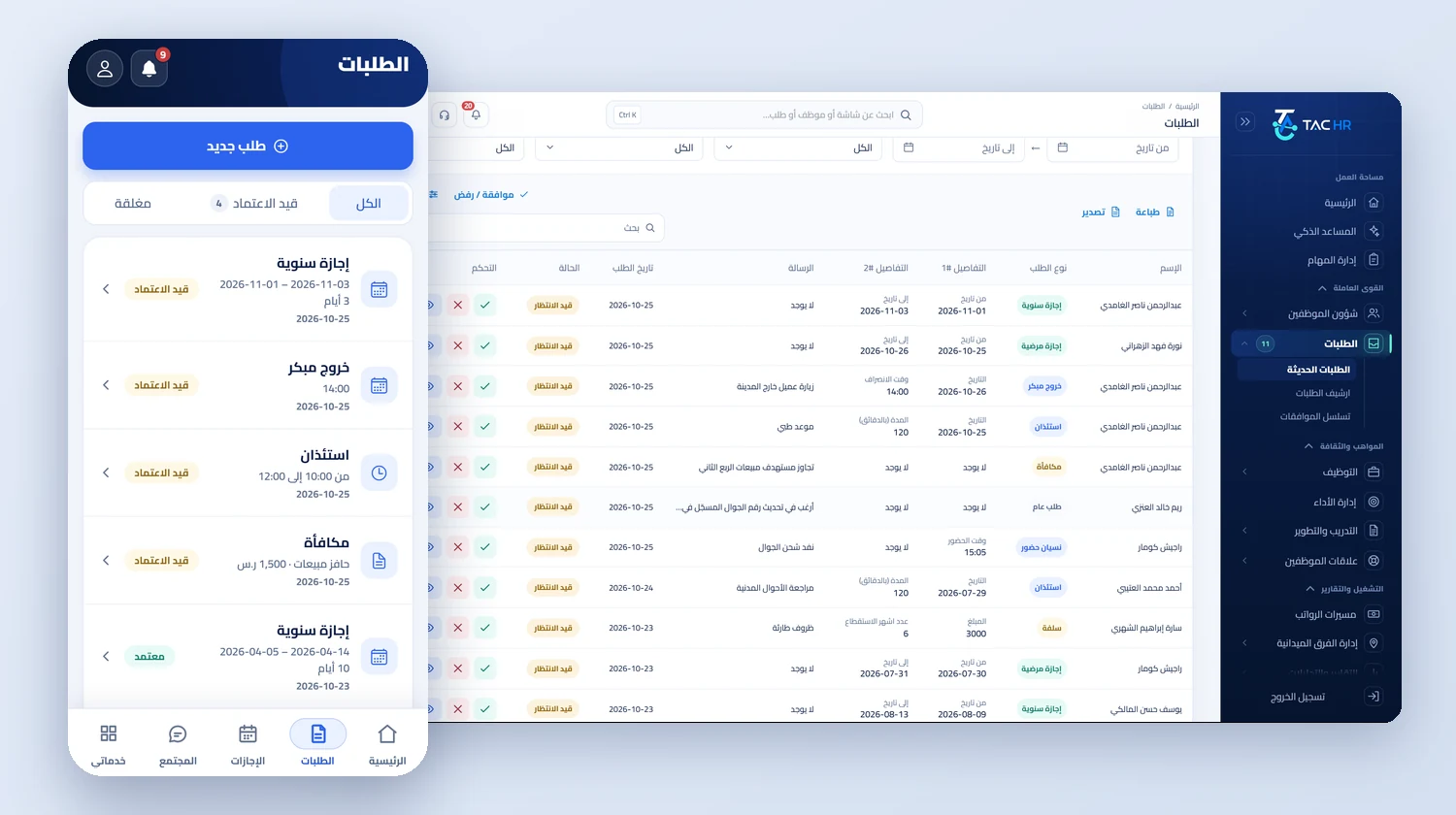
Employee requests
The requests list in the admin console as a table with each request's type, details and status and approve and reject buttons, next to the requests screen of the employee app with its All, Pending approval and Closed tabs and a new request button
From the phone

One employee app opens all of this

The employee files a request from the phone, sees the balance of each leave type before sending, follows whose desk it is waiting on, and cancels a pending one after a change of mind. From the same app they file a complaint, acknowledge a warning and object to it, answer a survey and read an announcement.

  • A four-language interface: Arabic, English, Urdu and Hindi
  • Requests appear according to your company's services, so a loan request stays hidden from a company without payroll
  • A phone notification on every decision: your request was approved or rejected, your letter is ready, a warning needs your acknowledgment
See the employee app

What the app opens for the employee

From the phone, according to your company's services

  • Requests
  • Leave and balances
  • Complaints
  • Warnings
  • Custody
  • Announcements and surveys
The flow

How the process runs end to end

  1. 01

    Set up

    Configure leave types and balance rules, each type's approval route, and the auto-approval limits

  2. 02

    File

    The employee files from the phone, and the system checks the balance, reserves the days and blocks overlapping leave

  3. 03

    Decide

    Approved at once within the limits, or routed with a notification to each approver, with delegation when needed

  4. 04

    Apply

    The balance is deducted, the letter is issued, the employee hears the decision, and it stays in the requests archive and the leave report

After rollout

What actually changes

Every figure in this section is a setting or a limit configured in the system. The effect on your company is something you measure after rollout.

30 days
An employee's annual entitlement rises from 21 to 30 days on its own after 60 months of service, prorated in the year of the increase
7 types
Never auto-approved, whatever the rule says, among them promotion, IBAN updates, data changes, resignation and clearance
5 days
The default deadline to answer a complaint, after which it is escalated once to the system administrator without naming the author of a confidential complaint
3 days
A warning not acknowledged within them is reported to the employee's direct manager and to whoever manages warnings, and the window is set per company
5 working days
The window to object to a warning from the day it was acknowledged, shown with the same number in the warning text and in the app
07:00
The violations engine reads lateness and absence events every morning, so HR finds the proposed actions ready for a decision

Limits of this service

Attendance requests such as a forgotten punch or a permission belong to the attendance service, and financial requests such as loans, allowances and IBAN updates belong to the payroll service, so they appear only to companies subscribed to those. Auto-approval is off for every type until your company sets it, and it never approves a request that falls in a locked payroll period. Letters are issued from the system's templates and the employee's file, and they are not sent to any government body. The violations engine works only on recorded attendance events, and other violations are recorded by hand. The system's programmed request types cannot be deleted, while your company's own types can be disabled and re-enabled from their screen.

Try employee requests on your own request types and routes

We tailor the demo to your leave types, approvers and auto-approval limits, starting with the request that stalls in your company today.