TAC HRTAC HR
Three technicians in work overalls: one preparing his kit from a service van, another carrying a toolbox, and a third working on an electrical panel outside a building
Industry solution

Attendance System for Maintenance and Operations Companies

A geofence per contract site, maintenance tasks with priority, location and escalation, and on-call duty with its overtime

A maintenance company sells its technicians' time: the contract says who is at the client's site and when, and every hour of absence becomes a deduction or a complaint. TAC HR proves attendance inside the site boundary, hands out maintenance tasks with a priority and a date, works out on-call duty and overtime, and produces the pay from the same record.

Today's reality

What happens in this industry without a system

  • 01Technicians work in clients' buildings under different contracts, so it is hard to prove a technician was at the agreed site at the agreed hour
  • 02A technician is called from their site to an urgent job at another, so their place of work changes in an hour and the manager does not know where they are
  • 03Maintenance calls are handed out by phone and message, so nobody knows a call was not closed until the client complains
  • 04The on-call technician works after shift hours and reaches the site an hour later, with no record of the arrival time when the client asks about response time
  • 05Technicians' iqamas, insurance and contracts expire at scattered times, and a client may ask for their papers before they enter the site
With the platform

What changes in your working day

  • A boundary per contract site

    Each client building is defined as a site with a boundary on the map, the technician punches inside it, and the site name shows in their attendance record, which can be printed or exported as a spreadsheet file.

  • Moving between sites

    For a technician called to several sites, a punch place spans the sites you choose, and someone moving to a new contract raises a location change request.

  • On-call duty and overtime

    A night on-call shift is defined, its check-out punch stays open for three hours after it ends, and overtime runs on approved assignments with its formula.

  • Tasks with priority and location

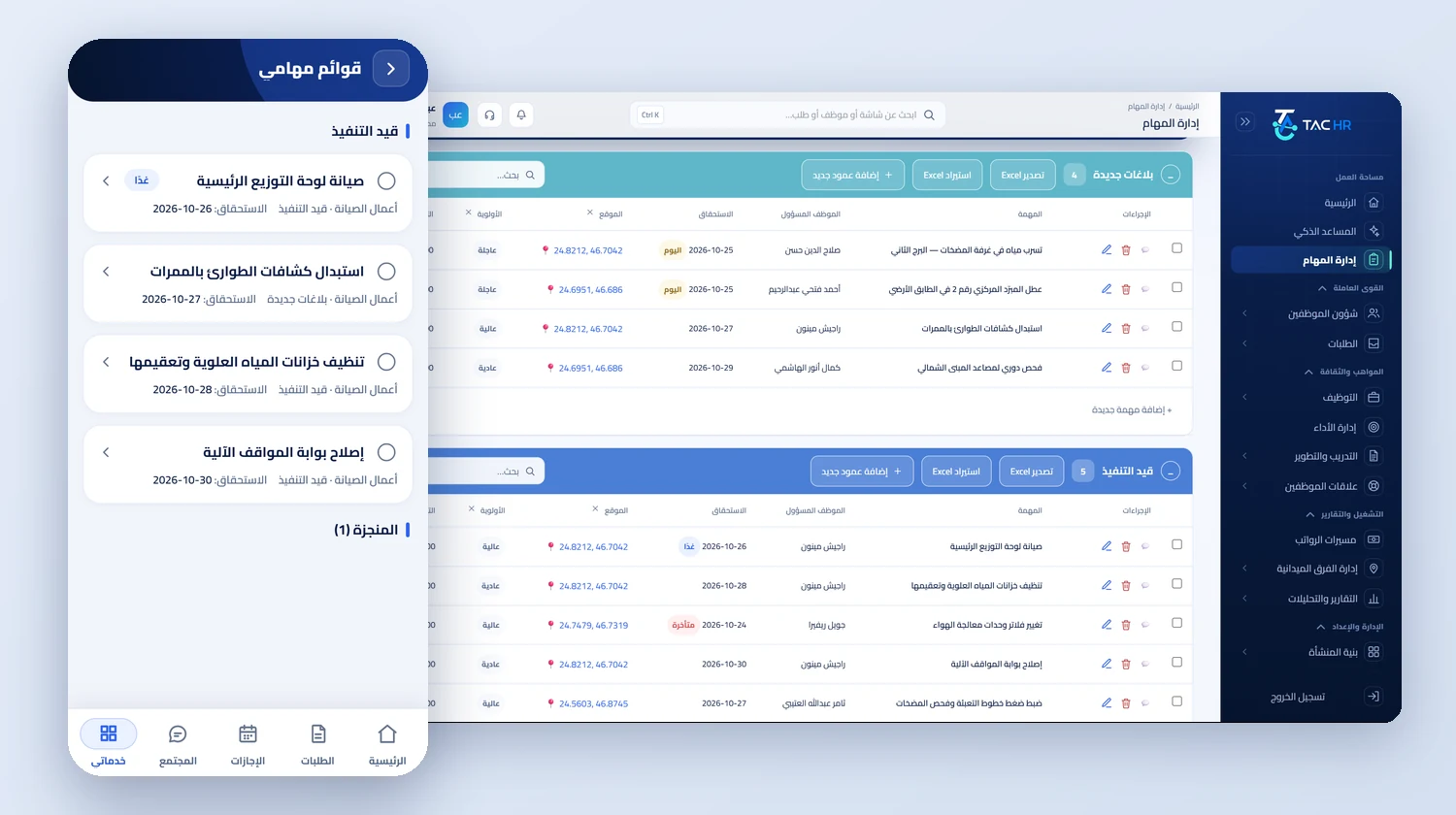
    A Maintenance work list with a location column holding coordinates, a priority of urgent, high or normal and an estimated cost, and the task is completed from the technician's phone.

  • Reminder and escalation

    The assignee gets a reminder the day before the due date and on it, and if the task slips by two days the escalation goes to its creator and the assignee's direct manager.

  • Technicians on the move

    For someone who moves between sites all day, field tracking is switched on: a visit inside a radius the system checks, and a live map during the shift only, with their consent.

Inside the platform

How it actually works in your company

A maintenance and operations company sells its technicians' time. The contract with the client sets how many technicians are at its site and for how many hours, so quality is measured by precise attendance at the right site, and any hour of absence turns into a deduction from the client or a complaint. So TAC HR is built around the site and the technician together: a site per contract with its boundary, a technician assigned the sites where they may punch, tasks with a priority and an escalation, and on-call duty with its overtime. The run reads all of it. This page explains how that runs in a company operating several contracts, and what stays outside the system.

01

A site per contract

Every site in the system has a name, a city and a boundary drawn on the map as a polygon or a circle. At the punch the system checks the phone's coordinates against the boundary: inside it the punch is accepted and attributed to the site, and outside it the punch is rejected with a message naming the nearest allowed site and the technician's distance from it, and the attempt is recorded for admins on the web. Before every punch the app inspects the device, rejecting spoofed locations, emulators and modified devices. The site name shows beside the check-in and check-out times in the attendance sheet, which can be printed with paper and signature options or exported as a spreadsheet file, so the manager has what proves to the client that the technician was at their site.

02

A technician called to another site

Each employee has a punch place setting that overrides the company's: only their assigned site, or several sites you choose, or all of the company's sites, or anywhere. So a technician called to a job at another site can punch there with no transfer request, and that site is recorded. If they move to a new contract for good they raise a location change request, or an admin who holds the on-behalf permission within their scope raises it for them. For a technician who moves between sites all day, field tracking is switched on with a rep seat: they record their visit to an approved client site inside a radius the system checks, and their position is shown on the map during the shift only, with their consent.

03

Maintenance tasks

The tasks section has a ready template called Maintenance work with a location column holding coordinates, a priority of urgent, high or normal, and an estimated cost, and you add your own columns to it. A task is assigned to a technician with a due date, and they get a reminder the day before it and another on the day, and if it reaches the configured escalation grace, two days by default, the escalation goes to the task's creator and the technician's direct manager. So a task due on 10 November reminds on 9 November and on 10 November, and escalates on 12 November if it is not done. The technician completes it from their phone and comments under their own name, so the manager sees from the morning which call is still open, not when the client complains.

04

On-call duty and trips

Faults do not follow the shift schedule, so a shift is defined for evening or night on-call duty, and the check-out punch of a shift that crosses midnight stays open until three hours after its end so it is not counted as forgotten. The overtime source is an explicit setting: approved assignments only is the default. Under the Saudi labour law model on basic pay, an overtime hour is paid at 1.5 times the normal hourly rate: a technician on a SAR 4,800 basic has a normal rate of SAR 20.00 an hour, so five approved hours appear on the payslip as a separate line with its formula, worth SAR 150.00. Someone assigned to work in another city raises a business trip request whose days are not counted as absence, and a daily allowance the company sets is worked out for them: four days at SAR 180 come to SAR 720.00.

05

Documents and the run

A daily job at 06:00 checks the iqama, passport, medical insurance and contract-end dates in each technician's file, and the uploaded documents that carry an expiry date, including the professional card. Every document moves through its stages on the company's lead times, 60, 30 and 7 days by default, and admins receive one daily summary, so the papers are ready when the client asks. The run draft is created automatically on a day the company sets, and both GOSI shares are worked out by the employee's system: a Saudi technician on the previous system with a contributory wage of SAR 5,000 has SAR 487.50 withheld at 9.75%, and the company carries SAR 587.50 for them. Before export the wage file page checks IBANs, IDs and the company number.


Inside the interface

The screen as your team uses it

Attendance System for Maintenance and Operations Companies
The task management page with two tables, new reports and tasks in progress, each task with an assignee, a due date, a location with coordinates and a priority, next to the my task lists screen in the employee app with tasks in progress
An operating day

How the day runs on the platform

  1. 01

    Before the contract

    Each contract site is defined with its boundary, shifts and on-call duty are assigned, technicians are assigned to their sites, and the Maintenance work list is created

  2. 02

    The morning

    Technicians punch inside their sites' boundaries, the manager sees who arrived and who is late, and assignees get a reminder of the day's tasks

  3. 03

    On an urgent call

    A task with an urgent priority and a location is assigned, the technician called out punches at the call site, and the record shows the hour they arrived

  4. 04

    Month end

    The run draft is created, approved on-call hours and trip allowances are reviewed, and the wage file is checked and exported

The numbers

What the system works out for you

The figures come from a hypothetical example, computed by the system's own functions. The effect on your company is something you measure after rollout.

SAR 150.00
Pay for 5 approved overtime hours for an on-call technician on a SAR 4,800 basic, at an overtime rate of SAR 30.00 an hour shown with its formula on the payslip
SAR 720.00
The trip allowance for a technician assigned 4 days at a site in another city, at a daily allowance of SAR 180 set in the company, which enters the run as its own line
SAR 487.50
A Saudi technician's GOSI share in the October 2026 run under the previous system on a contributory wage of SAR 5,000 at 9.75%, with the employer's share at SAR 587.50

Limits of what the platform offers this industry

A punch is never recorded without an internet connection, so a site with no coverage needs a connection before the shift starts. The system does not hand calls out to technicians or build the on-call rota automatically: tasks are assigned and shifts defined by hand. A task does not repeat by itself. The system does not work out the response time between a call arriving and the technician's punch, and the record shows the punch time. The WPS file is a detailed table that comes out of the run after the checks and is not sent to any body, and GOSI is calculated and not paid from the system.

Industry questions

What this industry asks before deciding

Can I prove a technician was at a client's site?

Yes. The punch is recorded inside the site boundary, and the site name with the check-in and check-out times shows in the attendance sheet, which can be printed or exported as a spreadsheet file. A punch outside the boundary is rejected with its reason and distance, and admins see it on the web.

How do I follow up that a periodic inspection was done?

The inspection task is created in the Maintenance work list with a location, a priority and a due date and assigned to a technician, who gets a reminder the day before and on the day, and it escalates if not done. A task does not repeat by itself, so it is created each cycle.

Does it work for technicians who move between two buildings?

Yes, with a punch place that spans both buildings or all of the company's sites, so they punch in either with no transfer request. For someone who moves between sites all day, field tracking is switched on with a rep seat in the subscription.

What if the internet goes down at the client's site?

A punch is never recorded without an internet connection, because the system checks the site boundary and the device's integrity at the moment of the punch. A site with weak coverage needs a connection at shift start, and what was missed is recorded with a forgotten check-in request that goes through the approval route.

Request a demo on your own operation

We tailor the demo to your contract sites and technician teams, and start with what costs you today: attendance on site, tasks or on-call duty.