Inside the service
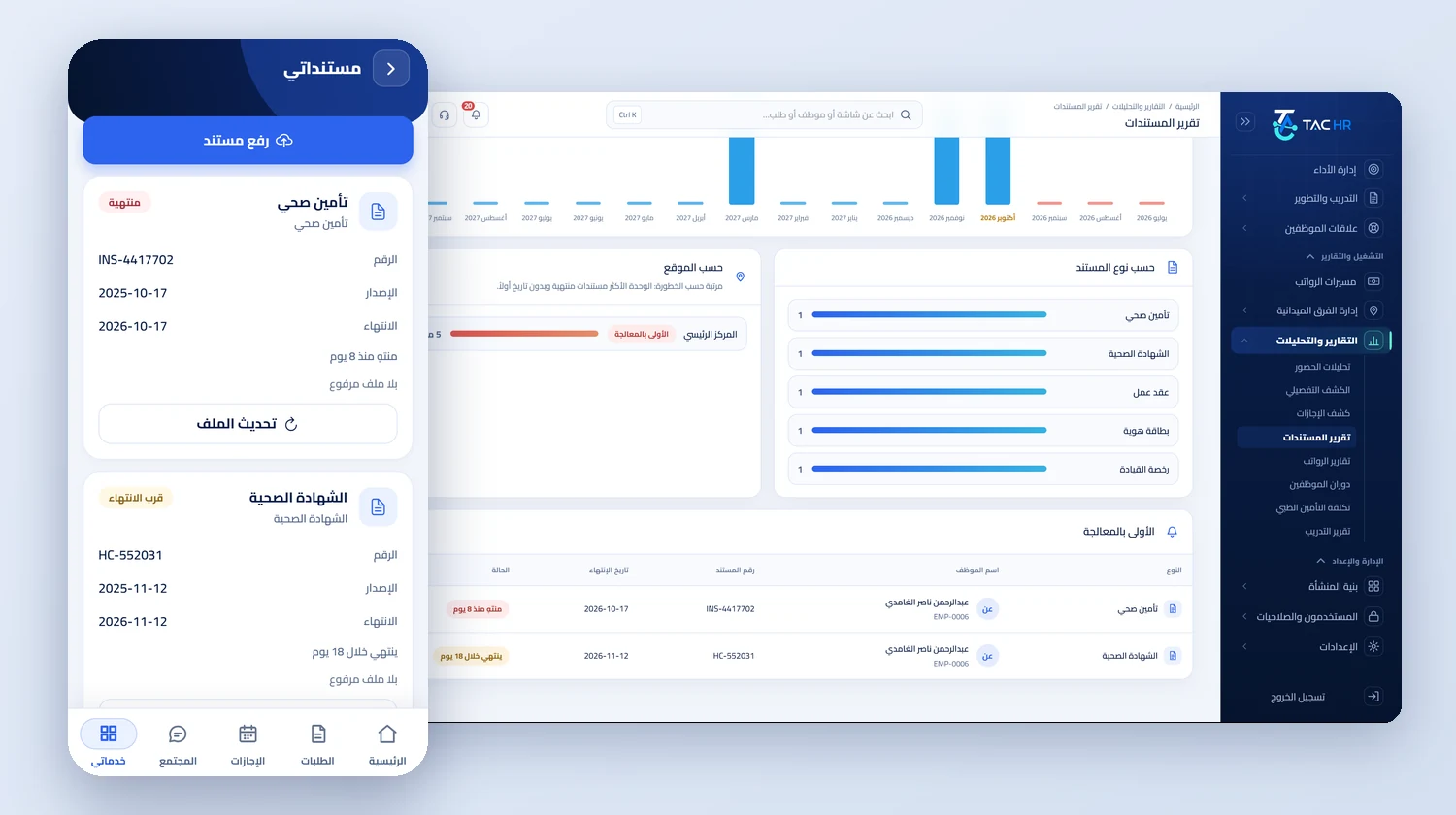
Archiving in HR is not storing scans. It is knowing what expires, when, and who is affected. This service gives every document a date the system reads every day, from which its status is derived, its place in the renewal pipeline is set, and its reminder goes out on time. Take a contracting company in Dammam with about 140 workers, most of them residents, each with an iqama, a work permit and health insurance. Their documents are recorded once with their numbers, dates and files, and the service then takes over the question that used to be asked too late: which document expires this month, whose is it, and what will renewing it cost.
01
One register for employee and company documents
On the employee's documents tab you choose the document type from its cards, enter its name, number, issue and expiry dates, its annual cost if there is one, and upload its file as an image or a document of up to 25 MB, with the file type checked from its content rather than its name. Employees have 14 types, among them the work permit, the professional card and the health certificate the company renews, and the IBAN certificate requested whenever an IBAN is registered. The company documents screen holds the company's own records with their counters: valid, expiring within 60 days, and expired, filtered by type and by whether a file is attached, and sorted by expiry, issue date or name. Letters issued from approved requests, such as the salary letter, are saved to the same employee documents.
02
Each document's status is read from its date
Nobody types that a document has expired. The status is derived every day from the expiry date in Riyadh time: expired once the date has passed, expiring if it falls inside the alert window, valid, or without an expiry date. In the documents report you choose an early alert window of 7, 14, 30, 60 or 90 days, 30 by default, filter by location, department and type, and search by name, employee number or document number. The overview tab shows the number of documents, expired, expiring and undated ones and the employees affected, a chart of expiries month by month from three months back to a year ahead, and locations ranked by how many expired or undated documents they hold. The log separates documents that never expire, such as a bank account, from documents missing their date.
03
The renewals pipeline and its four windows
The renewals tab gathers everything due for renewal into columns by due date: overdue, sorted from the most recent, then within 7 days, then day eight to day thirty in the 30-day column, then within 60 days, then within 90 days. An iqama at the Dammam company that expires in 30 days appears in the thirty-day column on a card with the worker's name, employee number, the expiry date and the days left. Below the columns sits a separate list of documents that need an expiry date and do not carry one, such as an ID, iqama, passport or contract recorded without a date, because an undated document enters no pipeline and triggers no reminder. Every tab has a print button that prints what is on screen with the same filters.
04
Compliance and costs in one report
The compliance tab computes, for each required document, the share of active employees within the filter who hold it in a valid state, together with those holding it expiring, expired or undated, and the number who do not have it at all. Then comes a table of employees missing an ID or iqama or an employment contract, or whose copy has expired, sorted by the number of gaps. The costs tab adds up the annual cost recorded on employee documents, what falls due in the next 12 months, the average, and the share of documents that carry a cost, with a monthly forecast of renewal cost, a split by type and location, and the ten most expensive documents. The report states plainly that the totals cover priced documents only when not every document carries a cost.
05
The reminder reaches who needs it, once
Every day at six in the morning Riyadh time, the system gathers expiry dates from three sources: fields in the employee file such as the national ID, iqama, passport, contract end, medical insurance and probation end; employee documents; and company documents, together with the group medical insurance policy. It then works out each item's stage from the company's windows, 60, then 30, then 7 days by default, then the expiry day, configured under notifications and automation. Every admin with report permissions receives one daily digest with the soonest expiry first, and the employee receives a phone reminder about their personal documents: your iqama expires in 30 days. Each item is reported once as it enters each stage, and a renewal with a new date restarts its stages from the beginning.