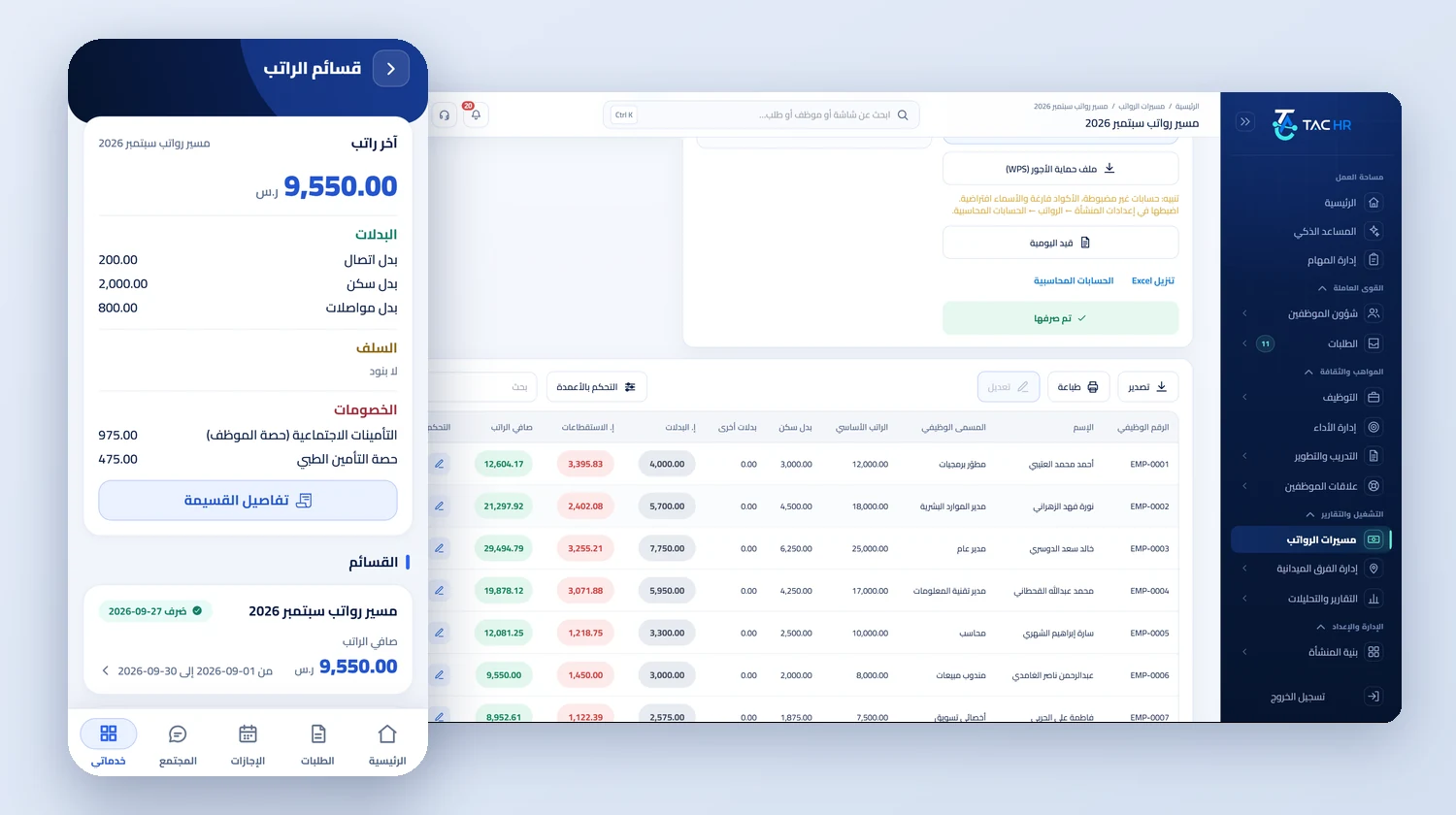
Inside the service
Pay in a Saudi company is a chain of small decisions: which days the employee is owed, on what basis lateness is deducted, where overtime comes from, and at what rate GOSI is withheld. This service turns each of those decisions into a setting in its own place, and the same engine reads it in the run, the payslip and the report. Take a retail chain with 12 stores in Jeddah, Makkah and Taif and about 95 employees. The month's run is created as a draft on the day you choose, the accountant reviews it and the finance manager approves it, then it is paid and locked, and every employee receives a payslip on the phone with lines they can follow.
01
From the setting to the line
The chain starts at the employee's file, then the employee's location, then the company, then the system default, and the closest setting wins. On the payroll settings screen you pick the calculation model: Saudi labour law, dividing the month by 30 and using the employee's shift hours, or a custom model in which you set the day divisor as a fixed number or the actual working days in the period, the hours in a day, and a factor applied to deductions, and then assign it to specific employees. Lateness, early departure and absence each have a deduction mode: the actual time only, the disciplinary penalty only, both together, or off. The basis of each deduction is basic pay by default, or gross pay, or custom settings where you pick the components yourself, such as basic pay and housing allowance.
02
Overtime with a visible formula
The overtime source is an explicit setting. Approved assignments only is the default, so only time approved through an overtime request is paid, while the attendance log option pays every minute after the shift ends, so someone who stays at the desk without an assignment is paid for it. Under the Saudi model on basic pay, an overtime hour is the normal hourly rate plus half the hourly rate of basic pay. An employee on a basic salary of SAR 6,000 with an 8-hour shift earns a normal hourly rate of SAR 25 and SAR 37.50 for an overtime hour, so two approved overtime hours appear on the payslip as a separate line of SAR 75.00 with its formula beside it. When an employee's overtime since the start of the year passes 720 hours, the run line shows a warning before approval.
03
GOSI as the engine computes it
The rates come from one table in the system and are applied by the employee's system and the start date of the period. A Saudi employee on the previous system, meaning one with contributions before 3 July 2024, has 9.75% withheld and the employer pays 11.75%. A Saudi employee on the new system has a pension rate that steps up every July to 11%, plus SANED at 0.75% on each side, and occupational hazards at 2% on the employer. A store supervisor who joined after that date, with a basic salary of 8,000 and a housing allowance of 2,000, has 10.75% withheld in the October 2026 run, which is SAR 1,075.00, with an employer share of SAR 1,275.00, and the deduction rises to 11.25% in the July 2027 run with no one touching it. For non-Saudi employees only occupational hazards apply, on the employer, and the contributory wage is capped at SAR 45,000.
04
Approval, locking and the payslip
A run moves through its stages: draft, in review, approved, being paid, and paid. You choose its approval chain when you create it, in sequence or in parallel, and its visibility, either every admin with the right permission or only the chain members, the run's creator and the system administrator. Once an employee is in a run being paid, that day is locked, so an attendance correction approved afterwards becomes an adjustment that the next run carries as a separate line, and a salary change backdated into a paid month is settled the same way. In the payslip editor you change one employee's lines or add a manual line. If you turn on hiding payslips until revealed manually, the run's payslips stay hidden until you reveal them with the eye button, and at payment every employee whose payslip is visible is notified.
05
The WPS file, the journal entry and the reports
Once a run is approved, the WPS page runs a check before generating the file. Errors block it: the company's Ministry of Human Resources number is missing, the payroll account IBAN is missing, an employee IBAN does not start with the country letters or is not 24 characters or fails its check digits, the same IBAN is registered to two employees, an ID is not 10 digits starting with 1 or 2, or a net amount is zero. Warnings do not block it, such as a bank code outside the known list. The file is a detailed table that opens in Excel in Arabic: the company header, then one row per employee with ID, IBAN, basic pay, housing, other earnings and deductions. Alongside it come a balanced journal entry with your account codes and cost centre, and payroll reports for monthly cost by department or branch, two-month comparison, GOSI, and allowances and deductions.