TAC HRTAC HR
Two supervisors in hard hats at a construction site in Riyadh reviewing the work schedule on a tablet
Industry solution

Attendance System for Construction Companies

A geofence per project, iqama alerts before they expire, and a payroll run that reads the same attendance

A contractor opens and closes sites project after project, and every site has crews who punch from their phones or from a device at the gate. TAC HR ties each worker to a site, works out attendance and overtime, tracks iqamas and documents, and produces the pay from the same record.

Today's reality

What happens in this industry without a system

  • 01One project ends and another starts across town, so crews move between sites and the trail of who was where and when gets lost
  • 02The supervisor takes attendance on paper or in a group chat, so nobody knows when or where a punch happened until a salary is disputed
  • 03Workers' iqamas expire on scattered dates, and an expired one is found only when the worker is stopped from working
  • 04Overtime is worked out in an outside sheet with a formula only its author understands, and workers ask about their hours at month end
  • 05The wage file is assembled from each project's sheets, so a salary bounces over an IBAN missing a digit and the error surfaces after pay day
With the platform

What changes in your working day

  • A geofence per project

    Each site's boundary is drawn on the map as a polygon or a circle, and a punch outside it is rejected, with its reason and distance recorded for admins on the web.

  • Moving crews between sites

    When a project ends, the worker is assigned to the new project's site with a location change request that an approver signs off, and earlier punches stay as they were recorded.

  • A supervisor on several projects

    Someone who works at more than one site gets a punch place covering the sites you choose, so they punch inside any of them without a transfer request each time.

  • A fingerprint device at the gate

    ZKTeco devices send to the system with a private key per device, so someone without a smartphone punches at the site door.

  • Iqamas and documents with alerts

    Iqama, passport, medical insurance, contract end, professional card and work permit alert admins 60, 30 and 7 days before expiry in one daily summary.

  • Overtime, area allowance and payroll

    Overtime shows its formula on the payslip, the area allowance is an automatic line for staff at a remote site, and the run produces a wage file after IBAN and ID checks.

Inside the platform

How it actually works in your company

Construction changes the place of work more than it changes the workers. A worker at a project in the north of the city today may be at a project in the east a few weeks later, and the iqama, pay and overtime travel with them. So TAC HR is built around the worker, not the site: one file for them, a site that is assigned and can change, and a punch that is accepted or rejected by that site's boundary at that moment. The run reads the attendance, overtime, loans and approved requests that were recorded, and archiving alerts before documents expire. This page explains how that runs in a company managing several projects at once, and what stays outside the system.

01

Every project is a site with a boundary

Every site in the system has a name, a city and a boundary drawn on the map as a polygon or a circle, and it has payroll settings that override the company's and are overridden by the worker's own file. At the punch the system checks the phone's coordinates against the boundary: inside it the punch is accepted and attributed to the site, and outside it the punch is rejected with a message naming the nearest allowed site and the worker's distance from it, and the rejection is recorded for admins on the web. A site with no boundary drawn does not reject the worker over an incomplete setting. A check-out is never blocked, because a worker must be able to end the day, but it is flagged in their sheet if it happened outside the boundary. Before every punch the app inspects the device, rejecting spoofed locations, emulators and modified devices.

02

From project to project

When a project ends, the worker does not get a new file. A location change request is raised with the new site chosen, either by the worker from their app or on their behalf by an admin who holds the on-behalf permission within their scope, and it goes through the approval route the company defines. When it is approved, the worker's location changes in their file, and the earlier punches stay in the attendance sheet as recorded. A supervisor or engineer who works across several projects has another setting: a punch place covering the sites you choose, or any of the company's sites, or anywhere, and each employee's own setting overrides the company's. The area allowance is a monthly line that follows the site the employee belongs to when the run is calculated.

03

Resident workers and documents that expire

A daily job at 06:00 checks the iqama, passport, medical insurance, contract end and probation dates in each employee's file, and the uploaded documents that carry an expiry date, including the professional card, work permit and health certificate. Every document moves through its stages on the company's lead times, 60, 30 and 7 days by default and then expiry, and admins receive one daily summary of what entered a new stage, while the employee gets a phone notification for their personal documents. Whoever's document is expiring raises a document renewal request of its type, which goes through the approval route. The alert rests on the date entered in the file, not on a lookup at any official body.

04

Overtime, area allowance and business trips

The overtime source is an explicit setting. Approved assignments only is the default, so only time approved through an overtime request is paid, while the attendance log option pays everything beyond the shift's end. Under the Saudi labour law model on basic pay, an overtime hour is paid at 1.5 times the normal hourly rate. A supervisor on a SAR 4,000 basic and an 8-hour shift has a normal hourly rate of SAR 16.67 and an overtime hour of SAR 25.00, so twelve approved hours appear on the payslip as a separate line with its formula, worth SAR 300.00. A remote site can carry a monthly area allowance added automatically for its staff, and if the company sets a daily trip allowance it is worked out from an approved business trip request for someone sent to work at another site.

05

The run and the wage file

The run draft is created automatically on a day the company sets each month. It reads each employee's attendance, overtime, loans and approved requests and writes every line with its formula. For a resident worker the employer carries occupational hazards alone, at 2% of the contributory wage, and nothing is withheld from the worker: a worker on a SAR 2,400 basic and SAR 600 housing costs the company SAR 60.00, and a crew of 25 costs SAR 1,500.00. Before export the wage file page checks IBANs, IDs and the company number and blocks the file on an error. Alongside come a journal entry with your account codes, a payroll cost report by branch, and a payslip on every worker's phone.


Inside the interface

The screen as your team uses it

Attendance System for Construction Companies
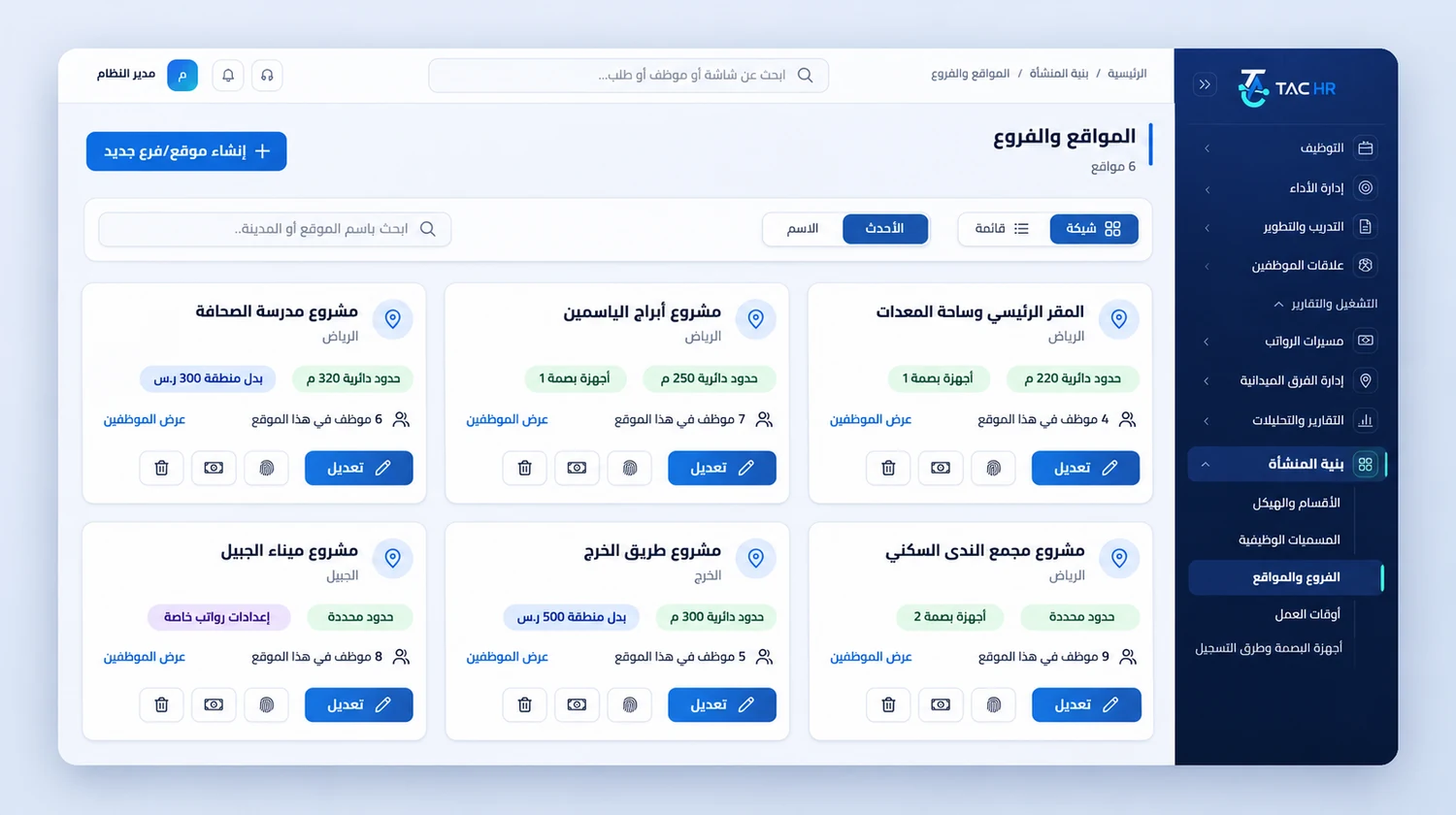
The Branches and sites screen in the admin dashboard: one card per project site with its city, boundary type and radius, number of employees and linked attendance devices, plus delete, payroll, devices and edit buttons
An operating day

How the day runs on the platform

  1. 01

    Before the project

    Draw the site boundary, set the project's shift hours, assign the crew to it, and connect the gate device if there is one

  2. 02

    The morning

    Crews punch inside the boundary, the manager sees who arrived and who is late, and the 07:00 summary lands in their inbox

  3. 03

    During the month

    Crews move between sites with a location change request, iqama and document alerts arrive, and overtime hours get approved

  4. 04

    Month end

    The run draft is created on the day you set, lines are reviewed, and the wage file is checked and exported with the journal entry

The numbers

What the system works out for you

The figures come from a hypothetical example, computed by the system's own functions. The effect on your company is something you measure after rollout.

SAR 60.00
The employer's monthly share for a resident worker on SAR 3,000: 2% occupational hazards with nothing withheld from the worker, which comes to SAR 1,500.00 for a crew of 25
SAR 300.00
Pay for 12 approved overtime hours for a supervisor on a SAR 4,000 basic, at an overtime rate of SAR 25.00 an hour shown with its formula on the payslip
60, 30 and 7
The alert days before an iqama that expires on 15 January 2027: admins are alerted on 16 November 2026, then 16 December, then 8 January

Limits of what the platform offers this industry

A punch is never recorded without an internet connection, so a site with no coverage needs a connection before the shift starts. Each employee is recorded in one location in the run at calculation time, so the payroll cost report by branch does not split a worker moved mid-month across two sites, and the area allowance is a monthly line for the site's staff rather than a per-day allowance. The WPS file is a detailed table that comes out of the run after the checks and is not sent to any body, and GOSI is calculated and not paid from the system. The system alerts on the iqama date you enter and does not verify it with the official bodies. Field tracking for supervisors is a separate service with seats in the subscription.

Industry questions

What this industry asks before deciding

Do I create a new site in the system for each project?

Yes. A project is defined as a site with its name, city and boundary on the map, and the crew is assigned to it, so they punch inside its boundary from day one. When the project ends the crew moves with a location change request and no new file is created for them.

Can a worker punch from outside the site?

Not unless the company allows it. By default a worker punches at their assigned site, and a punch outside its boundary is rejected with its reason and distance from the nearest allowed site, and admins see the attempt on the web. A check-out is never blocked and is flagged in the sheet if it happened outside the boundary.

Does the system alert before a worker's iqama expires?

Yes. Admins are alerted 60, then 30, then 7 days before expiry in a daily summary and the employee gets a phone notification, and the lead times are set by the company from fixed options. The alert rests on the iqama date entered in the file, so the system does not look it up at the official bodies.

Can I work out each project's cost from the system?

Partly. The payroll cost report groups runs by branch, meaning by the employee's site when the run was calculated, so it gives you the cost of each project's staff. A worker moved mid-month is recorded at one site in that month's run, and the system does not split them across two.

Request a demo on your own operation

We tailor the demo to your project sites and your crews' shift hours, and start with what slows your team down today: punching, iqamas or overtime.