TAC HRTAC HR
Two staff members review a tablet screen inside a fashion store, with more staff behind them at the sales counter
Industry solution

HR System for Retail Stores (Branch Staff Attendance)

A geofence per branch, shifts to match opening hours, and a payroll run that reads every branch from one record

A retail business is many branches with a small team in each, and one absence shows up in sales before it reaches head office. TAC HR ties each employee to a branch, accepts their punch inside its boundary, works out lateness and overtime, and produces every branch's payroll from one record.

Today's reality

What happens in this industry without a system

  • 01A branch team is small, so one absence shows up in sales the same day and reaches head office only with the end-of-week sheets
  • 02A mall branch opens at noon and closes near midnight while a residential branch opens in the morning, and one schedule for all suits neither
  • 03An employee covers another branch for a week in the offers season, so their attendance stays on their home branch's paper and nobody knows where they worked
  • 04Leave requests before the season reach the branch manager over a messaging app, and each is approved one by one with no view of who will cover
  • 05Branch attendance is collected at month end from scattered sheets, so payroll runs late and staff keep asking about their days and lateness
With the platform

What changes in your working day

  • A boundary per branch

    Each branch's boundary is drawn, and a punch outside it is rejected with its reason and distance from the nearest allowed site, while the app checks the device and rejects spoofed locations.

  • A shift per opening pattern

    A morning shift for the residential branch and an evening one for the mall, with start and end times, a lateness grace and days off, assigned to each branch's staff, and lateness is worked out on them.

  • Covering another branch

    Whoever covers another branch gets a punch place spanning several branches, so they punch in any of them with no transfer request, and the branch is recorded in their attendance.

  • The manager sees absence

    Whoever has not punched within the set grace after their shift starts is flagged to their direct manager, and head office gets a 07:00 summary of yesterday's absences and pending requests.

  • A route per request type

    Each request type has an approval route the company sets by role, user or direct manager, so season leave goes to the branch manager and then management.

  • Payroll that reads the branches

    The run reads each employee's attendance, overtime and approved requests and keeps their branch at the moment of calculation, so the cost report groups the month by branch.

Inside the platform

How it actually works in your company

In retail, HR is spread across points of sale, each with its own manager and opening hours, and head office sees a branch only through the paper that reaches it, so the full picture lags by days and an absence reaches sales before the record. So TAC HR is built around the employee and the branch together: one file for the employee, a branch assigned to them that can be several, a punch accepted by the boundary of the branch where it was made, and a shift that suits that branch's opening hours. The run reads the attendance, overtime and approved requests that were recorded. This page explains how that runs in a business managing many branches, and what stays outside the system.

01

Every branch has its boundary and its shift

Every branch in the system has a name, a city and a boundary drawn on the map as a polygon or a circle, and it has payroll settings that override the company's and are overridden by the employee's own file. At the punch the system checks the phone's coordinates against the boundary: inside it the punch is accepted and attributed to the branch, and outside it the punch is rejected with a message naming the nearest allowed site and the employee's distance from it, and admins see the attempt on the web. Before every punch the app inspects the device, rejecting spoofed locations, emulators and modified devices. Shifts are defined with start and end times, a lateness grace and days off, so the evening shift goes to the mall's staff and the morning one to the residential branch's, and lateness is worked out on the employee's own shift.

02

Whoever covers another branch

Covering leave and offers seasons means an employee works a week at one branch and a week at another. Each employee has a punch place setting that overrides the company's: only their assigned branch, or several branches you choose, or all of the company's branches, or anywhere. So whoever covers can punch at any allowed branch with no transfer request each time, and the branch they punched at is recorded and shown in the attendance sheet. Someone who moves to a new branch for good raises a location change request with the new branch chosen, or an admin who holds the on-behalf permission within their scope raises it for them, and it goes through the approval route while earlier punches stay in the sheet as recorded.

03

The branch manager, requests and alerts

An admin account can be given a scope of one or more branches or departments, so a branch manager works only on their branch's staff, while a holder of the full permission is not restricted. Each request type has an approval route that the company sets and edits: steps by role, by user or by the direct manager, sequential or parallel. So pre-season leave goes to the branch manager and then management, and so do permissions, early leave, forgotten punches and late removal. Whoever has not punched by the configured grace after their shift starts, 120 minutes by default, is flagged to their direct manager once a day, and whoever sees company-wide reports at head office gets a 07:00 summary with yesterday's absences, pending requests and expired documents.

04

The offers season and overtime

Before the offers season, branch hours grow beyond the shift's end. The overtime source is an explicit setting. Approved assignments only is the default, so only time approved through an overtime request is paid and its minutes are written to the attendance day when it is approved, while the attendance log option pays everything beyond the shift's end. Under the Saudi labour law model on basic pay, an overtime hour is paid at 1.5 times the normal hourly rate: a cashier on a SAR 3,600 basic has a normal rate of SAR 15.00 an hour, so ten approved hours appear on the payslip as a separate line with its formula, worth SAR 225.00. Lateness is deducted by the minute from the basic by default: an employee on a SAR 3,000 basic who arrives 18 minutes after their shift starts loses SAR 3.75.

05

The run and the documents

The run draft is created automatically on a day the company sets each month. It reads each employee's attendance, lateness, overtime, loans and approved requests and writes every line with its formula. The employee's branch is kept on their run line at the moment of calculation, so the payroll cost report groups the month by branch, and an employee moved mid-month is recorded at one branch in that month's run. Before export the wage file page checks IBANs, IDs and the company number, and alongside it come a journal entry with your account codes and a payslip on every employee's phone.


Inside the interface

The screen as your team uses it

HR System for Retail Stores (Branch Staff Attendance)
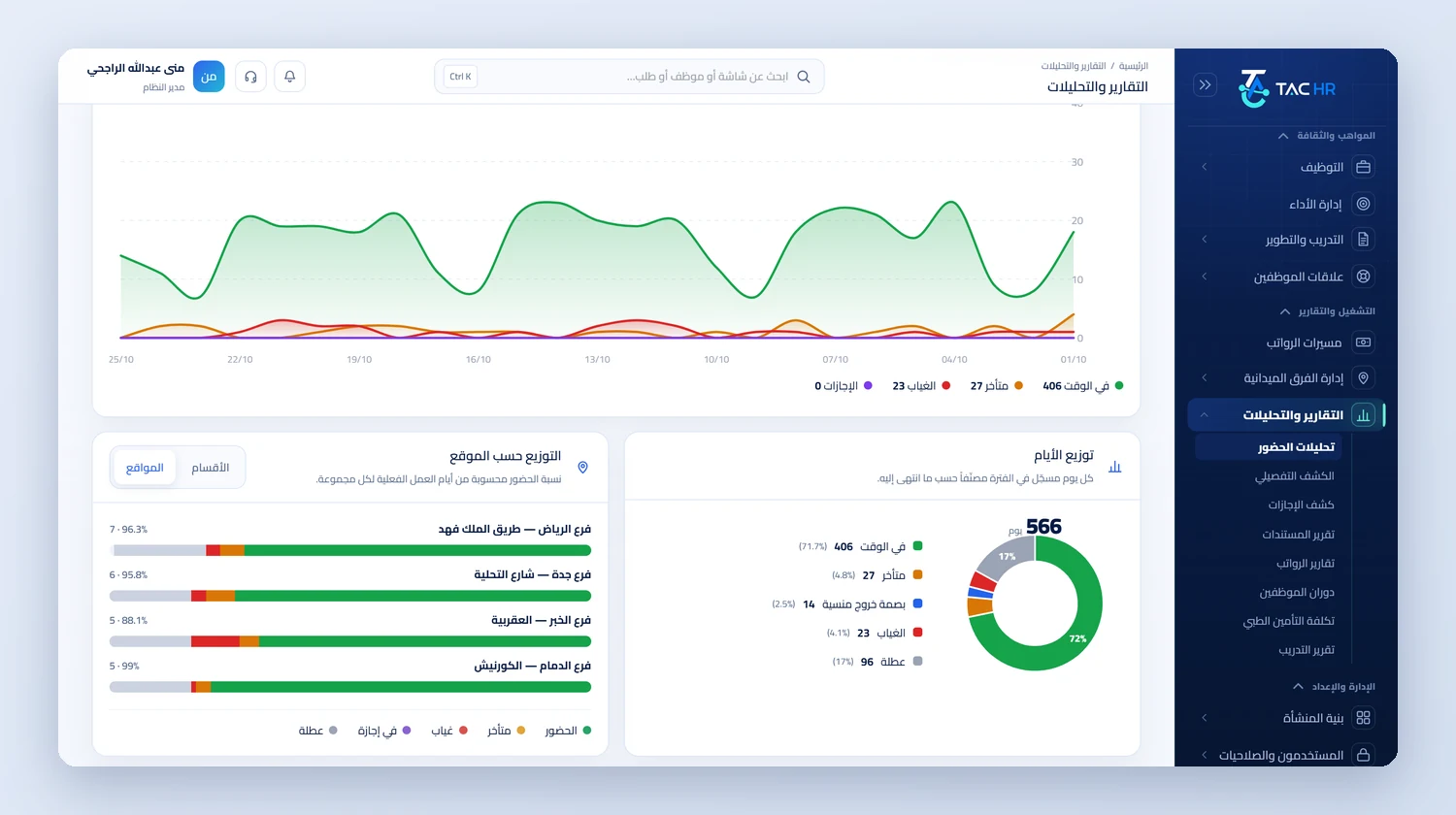
Attendance analytics in reports with a daily curve of attendance, lateness and absence, a ring chart splitting days into on time, late, forgotten check-out, absent and off, and bars showing attendance by branch
An operating day

How the day runs on the platform

  1. 01

    Before the season

    Branch boundaries are drawn, opening shifts are defined and assigned, the punch place is set for whoever will cover, and the season's jobs are posted

  2. 02

    The morning

    Staff punch inside their branch boundary, the branch manager is flagged anyone who has not punched within the set grace, and head office gets the 07:00 summary

  3. 03

    During the week

    Pre-season leave is approved along its route, cover moves between branches, and overtime hours get approved

  4. 04

    Month end

    The run draft is created and its lines reviewed, and the wage file is checked and exported with the journal entry and the branch cost report

The numbers

What the system works out for you

The figures come from a hypothetical example, computed by the system's own functions. The effect on your company is something you measure after rollout.

18 minutes
The lateness of a sales associate who arrived at 16:18 for a shift starting at 16:00, counted on their shift and costing SAR 3.75 if their basic is SAR 3,000 and no lateness grace is set
2,880 minutes
The net of a six-day week between 09:00 and 18:00 with a 60-minute break, which is 480 minutes a day
SAR 225.00
Pay for 10 approved overtime hours for a cashier on a SAR 3,600 basic, at an overtime rate of SAR 22.50 an hour shown with its formula on the payslip

Limits of what the platform offers this industry

A punch is never recorded without an internet connection, so a branch with no coverage needs a connection before the shift starts. The system does not build the rota automatically or estimate how many people each branch needs: shifts are defined and assigned. It does not read branch sales. Each employee is recorded at one branch in the run at calculation time, so the cost report does not split an employee moved mid-month across two branches. The WPS file is a detailed table that comes out of the run after the checks and is not sent to any body, and GOSI is calculated and not paid from the system. The health certificate is a document the system alerts on before expiry and does not verify with any body.

Industry questions

What this industry asks before deciding

Can an employee punch at a branch other than their usual one?

Yes, if the branch is within the punch place set for them: several branches you choose or all of the company's branches, and the branch name shows in the attendance sheet. If it is not within what they were allowed, the punch is rejected with its reason and distance from the nearest allowed site.

Does the system work in a branch with no fingerprint device?

Yes. A punch from the phone inside the branch boundary needs no device. For branches that prefer a device at the door, a ZKTeco device connects with a private key per device, and rejected submissions are recorded.

What if the internet goes down at the branch?

A punch is never recorded without an internet connection, because the system checks the branch boundary and the device's integrity at the moment of the punch. A branch with weak coverage needs a steady network at shift start, and what was missed is recorded with a forgotten check-in request that goes through the approval route.

Can I see each branch's cost from the system?

Partly. The payroll cost report groups runs by the employee's branch when the run was calculated, so it gives you the cost of each branch's staff. An employee moved mid-month is recorded at one branch in that month's run, and the system does not split them across two.

Request a demo on your own operation

We tailor the demo to your branches and their opening hours, and start with what throws your team off today: punching, requests or payroll.