TAC HRTAC HR
A two-person panel interviewing a candidate holding his CV in a meeting room overlooking Riyadh
Talent and culture

A recruitment system that ranks applicants with written reasons and turns the accepted one into an employee file

A careers page in your company's name with an application link for every opening, and screening that gives each applicant a score out of 100 with what raised it and what lowered it, without rejecting anyone. Then an interview whose time the candidate picks, an offer they answer from their email, and an employee file created from the terms of the accepted offer.

Before

What happens today without this service

  • 01The ad is posted in several places and CVs land in email and on phones, so nobody knows how many applied or where each application stands
  • 02CVs are read by eye in the order they arrive, so a good candidate is missed because they applied late or wrote their title in a way you did not expect
  • 03Setting a single interview takes rounds of messages, and then an interviewer misses it because it never reached their calendar
  • 04The candidate is accepted verbally, then their salary and allowances are typed into the employee file again, and the file drifts from what was agreed
Capabilities

Exactly what this service does

  • A careers page in your brand

    A fixed link with your company's name, logo and colour, in Arabic and English, with openings grouped by location.

  • A complete job ad

    Employment type, workplace, seniority, education and salary, and a «Write it for me» button that drafts the description, duties and requirements in both languages.

  • An application form you control

    22 fields, each hidden, optional or required, plus screening questions of ten types including choices, numbers and file uploads.

  • Screening with a score and reasons

    Every applicant gets a score out of 100 with what raised it, what lowered it and what deserves a check, and screening ranks without rejecting anyone.

  • A seven-stage pipeline

    From «New applicants» to «Hired» and «Not a fit», cards are dragged between columns and the candidate is emailed if you choose.

  • Interviews the candidate schedules

    You propose up to 5 slots and the candidate confirms one from a link, so they and the interviewers get an email invite with a calendar file.

  • An interview scorecard

    Five criteria scored 1 to 5 and a result, passed, on hold or not passed, with notes kept in the candidate's record.

  • An offer with a reply link

    Basic pay is kept apart from allowances with the total worked out in front of you, and the candidate accepts or declines from a one-time link before the reply date.

  • A talent pool and analytics

    Everyone who applied stays searchable, and analytics show time to hire, candidate sources and the effect of a hire on your Saudi share.

Inside the service

How it actually works in your company

In most companies hiring gets lost in the gap between the ad and the decision: applications scattered in different places, CVs read by eye, interviews arranged by message, and then the new employee typed in by hand. This service closes that gap in one pipeline. The candidate applies from your company's careers page, the application is saved with an instant screening score, and it appears in your team's «New applicants» column with a notification that it arrived. From the same card the interview is scheduled, the offer is sent and the hiring decision is taken, and every step is written into the candidate's timeline with who did it and when. The candidate follows the application from a link in their email.

01

From the job ad to the application link

Each company has a careers page with a fixed link that never changes after the first save, carrying your logo, your brand colour, a headline and an «About working with us» section in Arabic and English, up to eight items under «What we offer», and a privacy notice for applicants. Every opening has a visibility you choose: listed on the careers page, open only to whoever has the link, or internal and not listed publicly. You shape the application form field by field from 22 fields, such as nationality, residency status and transfer, years of experience, expected salary and notice period, and add screening questions of ten types. The «Write it for me» button drafts the ad from the opening's details and your notes, and editing it stays in your hands. When you switch the page off, its link stops opening and no application can arrive through it.

02

A score with reasons, not an automatic decision

When someone applies, screening compares what they wrote with what the opening asks for, and every applicant starts at 50. Take a chain of electronics stores in Riyadh hiring a «Sales representative» with two years of experience: an applicant with three years whose current title is «Sales representative» gets 20 for experience and 16 for the matching title, reaching 86, a «Strong match». An applicant with one year and an unrelated title stays at 36, a «Weak match», with what is missing written down, but they stay in the pipeline and are not rejected. Whatever the applicant left out is recorded as a gap worth asking about, not a fault that costs points. You can make an opening move anyone above a threshold you pick straight to the «Shortlist». When a CV reading model is switched on for the platform, the CV itself is read in the background and the score is updated.

03

Interviews without the back and forth

From the candidate's card you schedule the interview: phone, remote, on site, panel or practical test, its length in minutes, its address or meeting link, and the interviewers from your staff. You can choose «Let the candidate pick the time» and propose up to five slots, and the candidate opens a link and confirms one. Once the time is fixed, the candidate and the interviewers receive an email invite with a calendar file in Riyadh time, and a cancellation sends them a message that removes it from their calendars. After the interview its status and result are recorded and a scorecard is filled with five criteria: technical expertise, communication, problem solving, team fit and motivation. The candidate's tracking page shows only the stages and the appointments, never the team's notes or the screening score.

04

From the offer to the employee file

The offer is prepared with the job title, the basic salary and each allowance kept separate, so the total monthly pay is shown in front of you, along with the contract type, the probation period in days, annual leave, weekly working hours, the start date, the reply deadline and the letter's language. The candidate receives a link that accepts one reply only: they read the letter and sign their acceptance with their full name and national ID or iqama number, or decline with an optional reason, and the offer expires on its own after the reply date. While an offer is awaiting a reply the candidate cannot be hired. On «Hired» the employee file is created from the accepted offer with a new employee number, carrying the basic salary, the allowances, the start date and the end of probation. A Saudi candidate requires choosing the social insurance system, and the opening closes when its vacancies are filled.

05

The talent pool and the analytics

Everyone who applies to any opening enters the «Talent pool» automatically and stays searchable by name, title or the text of the cover letter, and you can search inside the CVs themselves, or pick an opening and ask: who in the pool fits it? You filter by work status, city and education, and leave out those already hired. «Recruitment analytics» opens on the last six months by default: the number of applicants and hires, the average time to hire in days, those who miss one of an opening's conditions, the score distribution, and where good candidates come from. It also shows the «Saudization effect»: a company with 12 Saudis out of 40 employees stands at 30%, which becomes 31.7% if it hires a Saudi and 29.3% if it hires a non-Saudi.


Inside the product

The screen as your team uses it

Recruitment
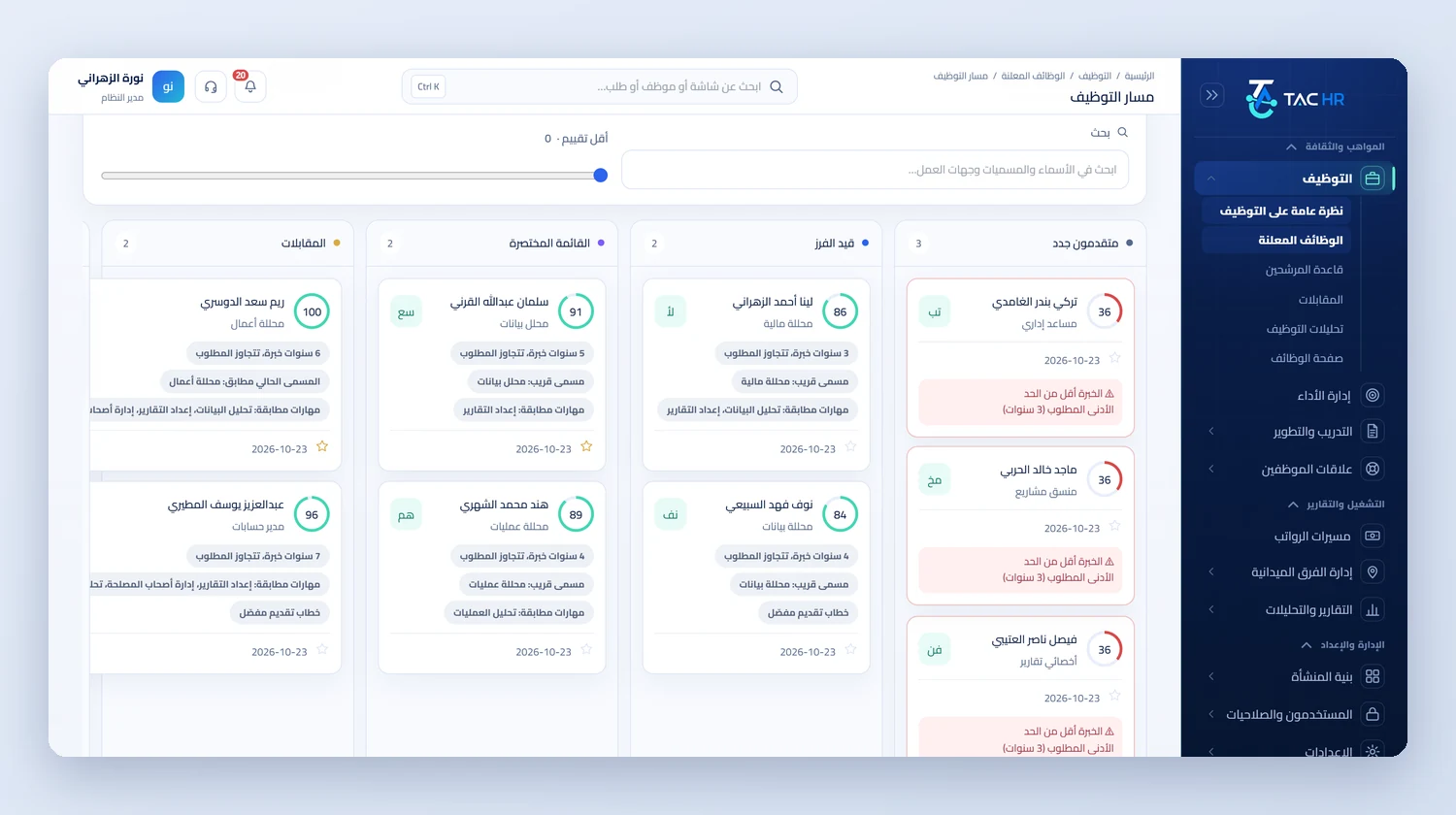
The hiring pipeline with the «New applicants», «Screening», «Shortlist» and «Interviews» columns and applicant cards with each one's score and years of experience, and in front of it an open candidate card with its tabs, the buttons that move the candidate between stages and the hire button
The flow

How the process runs end to end

  1. 01

    Advertise

    Create the opening, set the application form and screening questions, then list it on the careers page or share its link

  2. 02

    Screen

    Every application arrives with a score and reasons, and the strongest move to the shortlist at a threshold you pick

  3. 03

    Interview

    Proposed slots the candidate confirms, an invite with a calendar file, a scorecard and a result

  4. 04

    Hire

    An offer answered from a link, then an employee file created from the terms of the accepted offer

After rollout

What actually changes

Every figure in this section is a setting or a limit configured in the system. The effect on your company is something you measure after rollout.

100
Your team opens the applicant list ranked by a score out of 100 for every application and its reasons, instead of reading them in the order they arrived
5 slots
You propose up to 5 slots in a single invite, and the candidate confirms one themselves so the calendar reaches them and the interviewers
One reply
The offer link accepts a single reply, renewing it voids the previous link, and the offer expires on its own after the reply date
2 MB
CVs in PDF or Word up to 2 MB are stored outside the public files and open only for someone with the permission
300 applications
Applying pauses at 300 applications a day for the company or 30 on one opening within 10 minutes, and the hiring team is alerted to the unusual surge
6 months
Analytics open on the last 6 months: applicants, hires, average time to hire in days and the hire rate

Limits of this service

The system never rejects an applicant automatically: the score is a ranking and the decision belongs to your team. Rule-based screening reads what the applicant wrote in the form, such as experience, title and cover letter, and reads the CV file itself only when a CV reading model is switched on for the platform. The service does not post your ads to external job boards; it gives you a link to share wherever you like. Accepting an offer is a signature with the full name and ID details through the link, not a certified electronic signature. Candidates have no account in the app and follow their application from the tracking link in their email, and internal openings are not shown to employees in the app but open through their link.

Try recruitment on your own openings

We set the demo up on a real opening of yours: the careers page, the application form, and the applicant pipeline through to the employee file.