TAC HRTAC HR
A wide open-plan office with desk clusters where men and women sit, and a manager walking between the rows holding a tablet
By company size

HR Software for Medium-Sized Businesses

An approval route for each request type, permissions scoped by branch and department, and a payroll that HR and finance review together before approval

When branches multiply, the question changes from who is in today to who approves what, and with what permission. In medium-sized businesses TAC HR answers that with an approval route for each request type, permissions scoped by branch and department, and a payroll that HR and finance review together before approval.

Today's reality

What happens when branches multiply without a system

  • 01An approval goes to whoever the employee calls first rather than whoever owns the decision, so a loan is approved with no look from HR or finance
  • 02A branch manager sees another branch's data because the file is shared, or is blocked from their own staff because blocking is wholesale, so no limit fits each manager
  • 03The branches' payroll is gathered from different sheets, so finance does not know where a line came from, who added it or by what formula
  • 04Employees who joined on different dates fall under two GOSI systems, and the old sheet computes them all at one rate
  • 05Shifts differ between branches and an employee covers another branch, so attendance figures diverge between managers who share no single record
With the platform

What changes with a medium-sized business

  • A route per request type

    The company sets each type's approvers by role, user or the employee's direct manager, in sequence or in parallel, so leave passes the branch manager and a loan passes HR and then finance.

  • A limit for each manager

    Permission is given by a scope of one or more branches or departments, so the Dammam manager sees Dammam staff alone, the full picture stays with whoever holds the full permission, and every change shows in the audit log.

  • Automatic approval within limits

    Each type has a rule with a per-request limit and a monthly limit per employee, off until you switch it on, and what exceeds it goes to the approver with a notice stating the limit, what was used and what remains.

  • A run with separate lines

    The run holds basic pay, allowances and deductions as separate lines, each with its formula: absence and lateness come from attendance, loans with their instalments from requests, and whoever the company names reviews it before approval.

  • GOSI per employee by their system

    The employee and company shares are worked out by the employee's system and the period's date, so in one run someone on the previous system and someone on the new one each show their own rate.

  • Branches with their boundaries and shifts

    Each branch has a boundary on the map and payroll settings that override the company's, a punch place spanning several branches for whoever covers, and a cost report that groups the run by branch.

Inside the platform

How approvals, permissions and the run are distributed

In a small business the owner knows everything, but when management spreads across branch managers and department heads three needs appear: that approvals reach the people who own the decision, that each manager has their own limit, and that the run is visible to whoever reviews it before it is approved. This page explains how TAC HR meets each of them, what the company sets, what the system works out and what goes beyond this size, so before you start you know how it will look with your branches.

01

Who approves what

Each request type in your company has a route edited from the approval sequence screen. You pick approvers from three places: an admin group, a named user, or the employee's direct manager, who is resolved from their file at the time of the decision. Then you set whether they approve in sequence or in parallel, and add observers who see the request without deciding. A request pins its route when it is created, so editing the sequence does not move a request already under approval. An approver can delegate their decision to a colleague who holds approval. Alongside the ready-made types the company adds its own, every request has a chat with attachments, and when it ends it moves to the requests archive.

02

A limit for each manager

An admin account is given a scope of one or more branches or departments, and branch and department combine with an or: whoever is assigned to the Jeddah branch and the Finance department sees the staff of either. An empty scope means the whole company, which belongs to the holder of the full permission. The company creates admin groups with their permissions and copies and edits them, and every change goes through one audit entry point with who did it and what it was before and after. Run visibility is a separate choice: all admins with the permission, or only the approval chain's members, its creator and the system admin, and the payment permission does not bypass it.

03

Automatic approval with limits the company writes

The request types screen has an automatic approval within limits table: each type has its unit, so days for leave, minutes for early leave and overtime, an amount for loans, allowances and bonuses, and a count for the rest. A rule has a per-request limit and a monthly limit per employee, and it is off for every type until you switch it on. Suppose a limit of two days a request and four days a month: a two-day request is approved at once, then one day is approved, then another two-day request goes to the approver as usual with a notice stating the limit, what was used and what remains. A request is never rejected, only referred. And seven sensitive types never enter a rule however one is written for them.

04

A run that whoever you name reviews

The run draft is created automatically on a day the company sets, reading attendance, lateness, overtime, loans and approved requests and writing every line with its formula. You choose its approval chain, so HR and finance review it together before it is approved. GOSI shares are worked out by each employee's system and the period's date, so someone on the previous system has 9.75% withheld and someone on the new one 10.75% in October 2026. The run line keeps the employee's branch at the moment of calculation, so the cost report groups the month by branch. After payment the run locks, and the wage file comes out as a detailed table after the IBAN check, with a journal entry carrying your account codes.

05

Branches with their boundaries and shifts

Each branch has a name, a city and a boundary drawn on the map as a circle or polygon, and it has payroll settings that override the company's and are overridden by the employee's own file. Shifts are defined centrally with start and end times, a lateness grace and days off and assigned to staff, so lateness is counted on each employee's own shift. Each employee has a punch place that overrides the company's: their own branch only, several branches you choose, or all branches, so whoever covers another branch punches there with no transfer request and the branch name is recorded in their attendance. Someone who moves for good raises a location change request that goes through the route, and earlier punches stay as recorded.


Inside the interface

A request as the approver sees it before deciding

HR Software for Medium-Sized Businesses
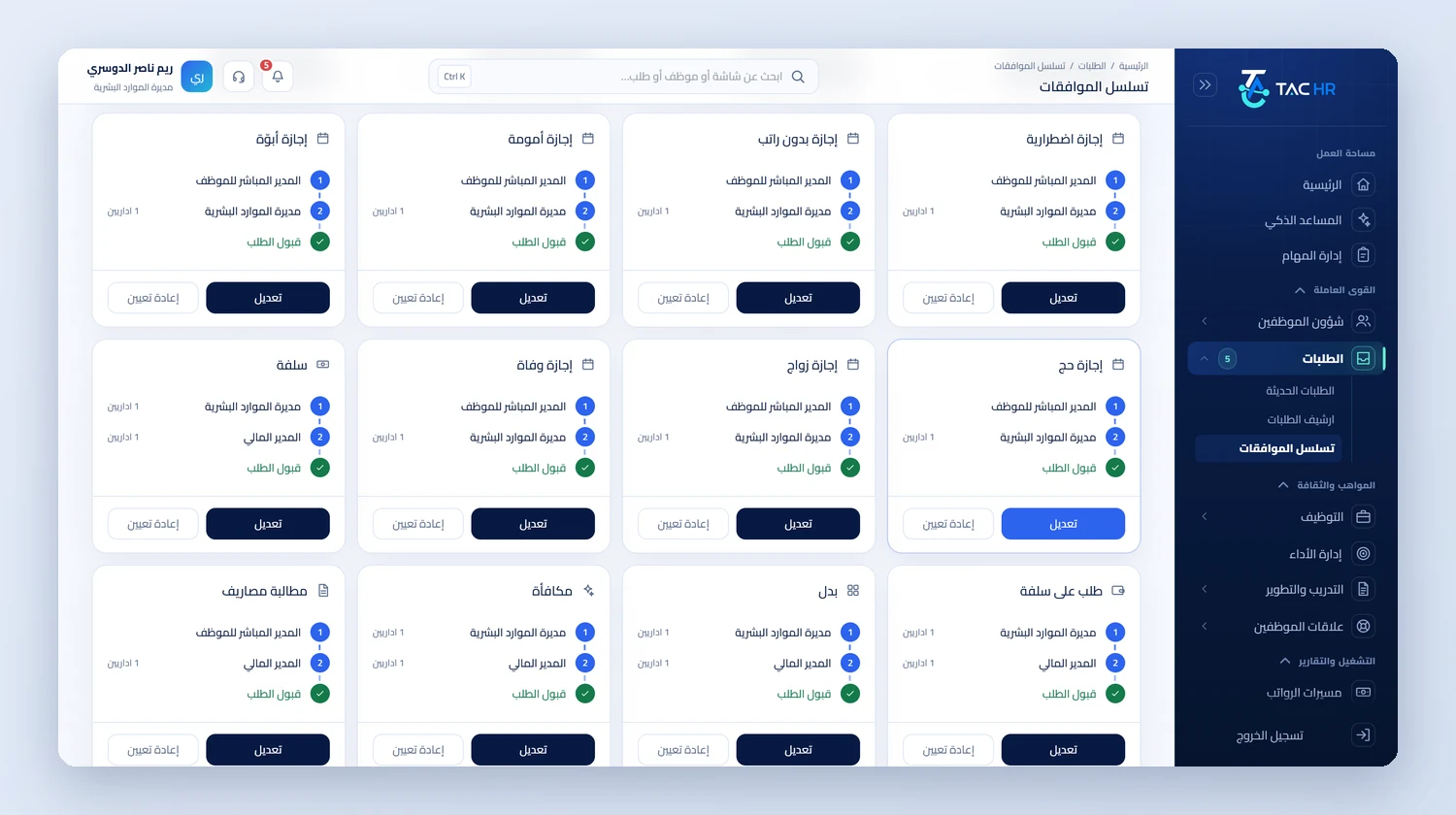
The approval chains page with a card for each request type, including emergency leave, unpaid leave, maternity leave, pilgrimage leave, advance, expense claim, bonus and allowance, with approval steps from the direct manager, the HR manager or the finance manager until the request is accepted, and edit and reset buttons
The right services

The services that tie your branches together

All services
An operating day

How a request and a month run on the platform

  1. 01

    Setup

    You set the route for each request type, create the admin groups with each manager's scope of branches and departments, and set the automatic approval limits

  2. 02

    The request

    An employee at the Jeddah branch raises a loan request, which reaches the branch manager, then HR, then finance along the loan route, and a manager at another branch does not see it

  3. 03

    Before approval

    The run draft is created on its day, and HR and finance review each employee's lines together, and the loan enters with its instalments automatically

  4. 04

    After approval

    The run locks at payment, the wage file and journal entry come out, payslips arrive, and the cost report is gathered by branch

The numbers

What the system works out for you

The figures come from a hypothetical example, computed by the system's own functions. The effect on your company is something you measure after rollout.

SAR 585.00
The GOSI share of a Saudi employee on the previous system with a wage of SAR 6,000 in October 2026, while their colleague on the new system has SAR 645.00 in the same run
One day
What is left of a monthly automatic approval limit of 4 days after 3 days are used, so a 2-day request after that goes to the approver with a notice and is not rejected
7 types
Never enter automatic approval however a rule is written for them, among them promotion, IBAN update, data change, device change, resignation and clearance

Limits of what the platform offers a medium-sized business

The run is one for the company, and management reviews its lines by branch and department before approval, and each employee is recorded at one branch in the run at calculation time, so the cost report does not split someone moved mid-month across two branches. What concerns several companies under one account goes beyond this page. Automatic approval is off for every type until the company sets it, and sensitive types never enter it. The wage file is a detailed table that comes out after the checks and is not sent to any body, and GOSI is calculated and not paid from the system. Requests are approved in the admin web interface, and the employee mobile app has no approval screen.

Industry questions

What a medium-sized business asks before deciding

How do I decide who approves each request type?

You define each type's route from the company settings with one or more steps, by role, user or direct manager, and add types specific to your company to the ready-made ones. Each request pins its route when it is created, so a later edit does not change it.

Does a branch manager see another branch's data?

No, unless their scope is given. Permission is by branch and department combined with an or, so someone assigned to two branches sees the staff of both, and someone with no restricted scope sees the whole company, which belongs to the holder of the full permission.

Is payroll split by branch?

The run is one for the company, and management reviews its lines by branch and department before approval, and the cost report groups the month by branch. An employee moved mid-month is recorded at one branch in that month's run.

Can I add a service after the subscription starts?

Yes. You switch on the services you need and stop the rest, and their screens appear to your staff and management once switched on. Only attendance is mandatory in every subscription, and the pricing page has a cost calculator with current figures.

Request a demo on your branch structure

We show you the routes and permissions on your own branch structure, and start with the type that trips you up today: leave, loans or payroll.