TAC HRTAC HR
Two colleagues in high-visibility vests inside a warehouse reviewing a tablet between racks of goods
Industry solution

Sales Rep Tracking System for Distribution Companies

A rep who starts the shift with a punch, visits whose location the system checks, and pay that reads the attendance

A distribution rep spends the day among shops, pharmacies and wholesale warehouses, and the manager has only the rep's word about it. In TAC HR the rep is an ordinary employee with a field switch: they start the shift with an attendance punch, their dot shows on the map during the shift only, and every visit is measured by its distance from the customer's approved location.

Today's reality

What happens in this industry without a system

  • 01The rep says they visited ten customers, and there is no evidence they reached any of their locations or how long they stayed at each
  • 02The rep leaves home for the first customer, so a punch at the warehouse door means nothing, and the attendance sheet sits in a different app from the one the salary is worked out from
  • 03Areas are assigned to reps in a sheet, and at the end of the week the supervisor does not know which customers in the area were actually visited
  • 04A rep leaves and takes the customer record and contacts in their phone, and the colleague who takes over starts from zero
  • 05Following a rep outside working hours is unacceptable, so tracking needs the rep's consent and has to stop when they clock out
With the platform

What changes in your working day

  • The rep is an employee with a switch

    Field tracking is switched on for an existing employee from their file, with no second account and no second app, within the rep seats in the subscription.

  • A shift that starts with a punch

    The field shift is an attendance punch with all its checks, so attendance sits in one record with the rest of the staff, and lateness is worked out if a shift is assigned.

  • A visit whose location the system decides

    The system measures the rep's distance from the customer's approved location against a radius between 20 and 2,000 metres, and marks the visit inside, outside or unconfirmed.

  • A customer record that does not walk away

    A customer with a tier, a status, several locations and contacts, where whatever the rep adds waits for management approval, so the record stays for whoever replaces the rep.

  • An area with a window and coverage

    An area is drawn and assigned to a rep with a window that has a start and an end, and its coverage is measured by verified visits and by the rep's actual path inside it.

  • Incentive, trips and payroll

    A sales incentive is a bonus request an approver signs off, the daily trip allowance comes from the business trip request, and the run reads the same attendance.

Inside the platform

How it actually works in your company

Tracking distribution reps fails when it becomes a parallel system: attendance in one app, pay in another, and customers in the rep's phone. So TAC HR builds tracking on the employee. The rep is an employee in their file, tracking is switched on with a toggle, and they see their field screens in the same employee app. They start the shift with a punch, and from that moment their phone sends its location until they clock out. What happens in between, visits and activities, is saved with its place and time, the supervisor reads it on the map and in reports, and the run reads the same attendance. This page explains it on a distribution company's day, and what the system does not do.

01

The rep is an employee, and the seat comes from the subscription

No separate account is created for the rep. An admin switches on the field employee toggle in the file of an employee who has a phone account, or adds them from the field team screen, and both routes pass through one point that saves the activation together with the employee in a single transaction so they never drift apart. Every subscription has a number of rep seats, and when they are full a message says so and no new rep is activated until another is stopped or seats are added. A stopped rep takes no seat and their device is unlinked, while their visits and shifts stay in their record, so nothing is lost when a rep leaves.

02

A field shift with the rep's consent

Before the first field shift the app asks the rep to agree to location tracking during the shift, and the shift cannot start without it. Then the rep goes through what any employee does at a punch: the device and spoofed-location check, the app integrity certificate, and fingerprint or face verification if the company turned it on. The punch is written to the same attendance record, so it reaches payroll like anyone else's. Tracking runs only while the shift is open, starting at the punch and stopping at the clock-out. A rep who does not clock out by the check-out cut-off has their field shift closed and a forgotten check-out recorded like any employee, so the phone does not keep sending its location after working hours.

03

A visit whose location the system decides

On arrival the rep picks the customer and the location, the app sends its coordinates and their accuracy, and the system measures the distance to the customer's approved location against a radius the company sets between 20 and 2,000 metres, 150 by default. A rep 140 metres from an approved customer, with a good location fix, has the visit marked inside the radius. If the distance is larger than the radius even at the fix's best accuracy the visit is outside, and if the accuracy band straddles the radius edge it is unconfirmed. A visit is never rejected: it is recorded with its mark and distance, so the supervisor sees every visit as it happened. A customer or location the rep added is not decided until management approves it.

04

Customers, areas and activities

A customer has a tier, a status, several locations and contacts, and a Google Maps link that pins its location. A visit carries activities with their fields, eleven ready types including a quote with its value, a purchase order, a collection with the payment method and receipt number, a promise to pay with its date, and a delivery, and the company adds its own types or switches off the ones it does not need. The supervisor draws the area and assigns it to a rep with a window that has a start and an end, and its coverage is measured by two signals: how many customers inside it the rep visited with a verified visit, and how many of its cells the rep's path crossed. The rep gets a notification a day before the window ends if it is incomplete, and the manager gets one if it ends below 50%.

05

Incentive, trips and payroll

A bonus is raised with the sales incentive type, its amount and a reason, by the rep or on their behalf, and it goes through the approval route, and whatever is approved enters the run as a separate line. Someone sent to visit customers in another city raises a business trip request with its destination and dates, so those days are not counted as absence, and a daily trip allowance is worked out if the company set one: three days at SAR 150 a day come to SAR 450.00. For a Saudi rep on the new GOSI system the share follows the period's date: on a contributory wage of SAR 6,250 in the October 2026 run SAR 671.88 is withheld at 10.75% and the company carries SAR 796.88. Each rep's visit and attendance reports print or save as PDF.


Inside the interface

The screen as your team uses it

Sales Rep Tracking System for Distribution Companies
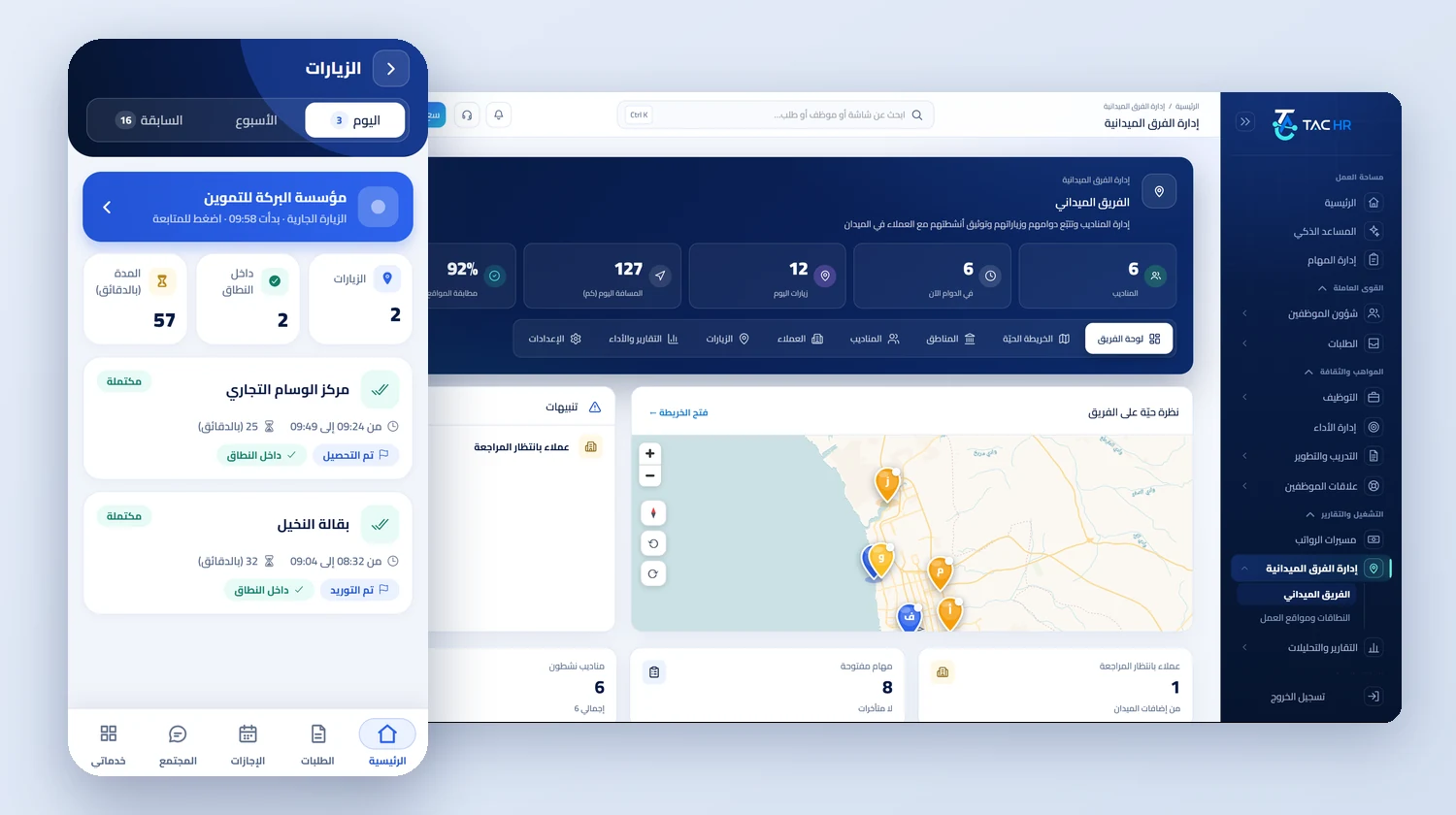
The field team dashboard in the admin with counters for reps on shift, today's visits, distance and location matching and a live map of the team, next to the visits screen of the mobile app with one visit in progress, two completed visits and a duration counter
An operating day

How the day runs on the platform

  1. 01

    The morning

    The rep punches the field shift and their dot appears on the map, and the supervisor sees who is on a visit, who is stopped and who is moving

  2. 02

    The visit

    At the customer the rep logs the arrival, the system works out the distance and marks the visit, then the rep records the activity: a quote, an order, a collection or a promise to pay

  3. 03

    The area

    The supervisor follows the assigned area's coverage by visits and by path, and the rep gets a notification a day before the window ends if it is incomplete

  4. 04

    The evening

    The rep clocks out and tracking stops, the supervisor reads the day's report, and attendance, trip allowance and the approved bonus reach the run

The numbers

What the system works out for you

The figures come from a hypothetical example, computed by the system's own functions. The effect on your company is something you measure after rollout.

140 metres
A rep's distance from an approved customer location, which the system works out, so the visit is marked inside the radius because it is under the default of 150 metres, which can be set between 20 and 2,000
SAR 450.00
The trip allowance for a rep sent to visit customers in Dammam for three days at a daily allowance the company sets at SAR 150, entering the run as a separate line with its formula
SAR 671.88
The employee's GOSI share in the October 2026 run for a Saudi rep on a contributory wage of SAR 6,250 at 10.75%, with the employer's share at SAR 796.88

Limits of what the platform offers this industry

A punch is never recorded without an internet connection. Path tracking is different: the phone keeps its points if the network drops, up to 3,000 of them, and sends them when it returns. The system does not work out sales commission from order values: activities are a record, not accounting, and the incentive is an amount raised as a bonus request that an approver signs off. A rep is not tracked outside the shift and cannot start a field shift without agreeing to tracking. A visit to a customer or location the rep added is not decided until management approves it. Field tracking is a separate service with seats in the subscription.

Industry questions

What this industry asks before deciding

Does the system track the rep after the shift ends?

No. Tracking runs during the field shift only. It starts with the attendance punch and stops at the clock-out, and only after the rep agrees to location tracking during the shift before their first field shift. The shift cannot start without that consent.

Can a visit be logged without the rep being at the customer?

Not without it showing. The system measures the rep's distance from the customer's approved location and marks the visit inside, outside or unconfirmed, it does not rely on the rep describing where they are, and the mark and the distance are shown to the supervisor.

Does the supervisor have a dedicated dashboard?

Yes. The supervisor has a field team dashboard with the number of reps on shift now, today's visits and distance, and a live map of the reps' positions with review alerts, and from it reaches customers, areas and reports.

Is the rep's attendance tied to payroll?

Yes. The field shift's start punch is the attendance punch itself, so the rep's attendance enters the monthly run like any employee's, together with the trip allowance and the approved bonus as separate lines. The system does not work out commission from order values.

Request a demo on your own operation

We tailor the demo to your reps, customers and distribution areas, and walk through a full rep day from the start of the shift to the evening report.