Inside the platform
A business owner sees the work from above: whether the team is complete today, what awaits their decision, what the month will cost and which document is nearing expiry. They do not need to go into each employee or wait for someone to summarise. This page explains how each of those reaches you in TAC HR, what you decide and what stays with your team, and what the system does not do for you, so that before you start you know what you will open every morning and what will reach you without opening anything.
01
The dashboard and the morning summary
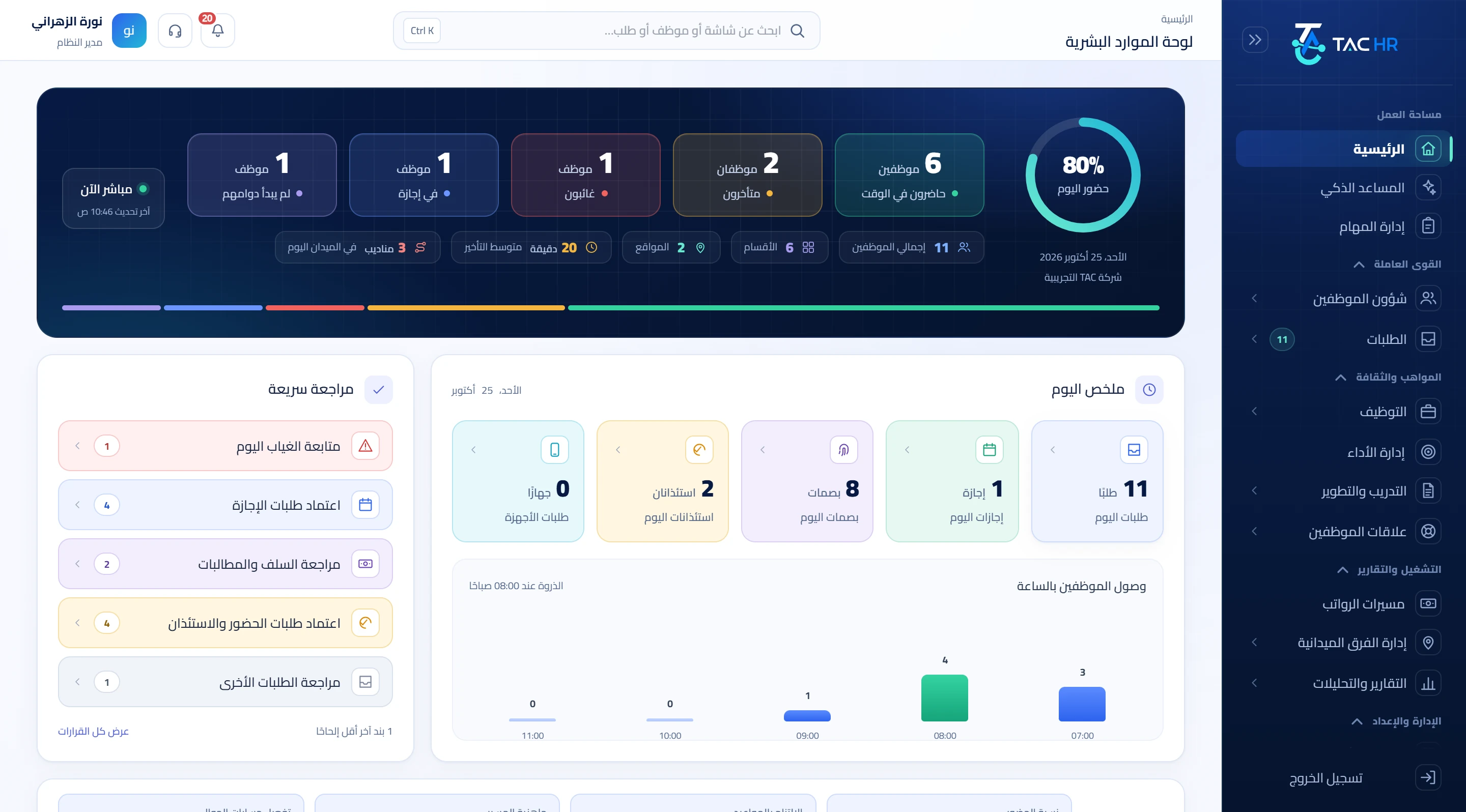
The admin home shows today's attendance in counters: on time, late, absent, on leave and not yet started, then today's summary, then a Quick review with the pending decisions, their numbers and a link to each. Whoever has not punched within the set grace after their shift starts, 120 minutes by default, is flagged to their direct manager once a day. And whoever sees company-wide reports with no restricted scope gets a 07:00 message with yesterday's absences, rejected punches, pending requests and expired documents, never sent on a day when every figure is zero. So the manager knows the problem before you, and you know it without asking.
02
Your decisions and the smart assistant
Every request type has a route your company sets: steps by role, by user or by the direct manager, sequential or parallel. You approve or reject from the requests screen and write your note in the request's chat. Automatic approval within limits is off for every type until you switch it on, so nothing passes without a decision except by a rule you wrote. The smart assistant is something you ask in Arabic about an employee or a branch, and it answers from live data under your own permissions, and what you cannot see it does not answer. If you ask for an action such as approving a request or correcting a punch, it shows a confirmation card valid for ten minutes and does nothing until you confirm.
03
Reports that reach you by email
In the automation settings you choose a weekly or monthly schedule and recipients. The weekly one holds attendance, leave and warnings for the full previous week from Sunday to Saturday, and the monthly one holds all six: attendance, leave, payroll, turnover, warnings and medical insurance. Each recipient gets one message with an Excel file carrying the company identity for each report they hold the permission for, and a summary in the body, never repeated for one period. The weekly one is sent from Sunday to Tuesday and the monthly one from the 1st to the 3rd, so switching the schedule on mid-week sends no stale report. A recipient limited to a branch or department is skipped, because the file covers the whole company. Alongside them is the turnover report with its monthly and yearly rate from the hire and termination dates in the file.
04
The run and bonuses
The run draft is created automatically on a day you set each month, reading each employee's attendance, lateness, overtime, loans and approved requests, and writing every line with its formula. You choose the approval chain when you create the run, and its visibility is for all admins with the permission or for the chain's members, its creator and the system admin alone, so those with no business in it do not see anyone's payslip. The cost report shows the month by department or branch. In performance the system writes a bonus proposal for whoever's result reaches the threshold you set, then a person with the payroll permission decides: approve, adjusting the amount and pay month, or reject, and what is approved enters the next run.
05
Permissions, the audit log and services
Every admin account has a scope of one or more branches or departments, so a branch manager is limited to their branch's staff, while the holder of the full permission sees the whole company. The company creates admin groups with their permissions and copies, edits and deletes them. Every change passes through one audit entry point with who did it and what it was before and after, so what left no trace did not happen. Each company's data is isolated from the others, and in multi-company groups each company keeps its own data. You switch on the services you need and stop the rest, and only attendance is mandatory in every subscription.