TAC HRTAC HR
A sales rep in Riyadh walking past a shopfront and checking his next visit on his phone
Operations and reports

Rep tracking with a shift that starts with a punch and visits whose location the system verifies

A rep is an ordinary employee in their file who starts the field shift with an attendance punch like anyone else, and their dot appears on the live map for as long as the shift runs. For every customer visit the system measures the distance to the customer's approved location, and every area assigned to the rep has its coverage measured by visits and by the route actually travelled.

Before

What happens today without this service

  • 01The rep says they visited the customer, with no evidence they were at the door or how long they stayed
  • 02The rep has one attendance sheet in the tracking app and another in HR, so payroll pays for something other than what they worked
  • 03Districts are split between reps in a spreadsheet, and at the end of the week the supervisor cannot tell which customers in the area were actually visited
  • 04Reps add new customers at rough locations, so later visits count as inside the boundary of a location nobody checked
Capabilities

Exactly what this service does

  • A rep is an employee with a switch

    Field tracking is switched on for an existing employee from their file or the team console, with no second account, within the subscription's seats.

  • The field shift is attendance itself

    Starting the shift is an attendance punch with every attendance check, so lateness and departure follow their shift and reach payroll like anyone's.

  • Consent and tracking during the shift

    The rep agrees to location tracking before the first shift, and the phone takes its location only while a shift is running, every 5 seconds on Android.

  • Live map and route

    Moving, stopped or on a visit, with the day's route cleaned of stray readings and drawn on the roads, including stops and distance.

  • A visit the system places

    The system measures the rep's distance to the customer's approved location and marks the visit inside, outside or unconfirmed.

  • Customers, sites and contacts

    A customer with a class, a status, several sites and contacts, and whatever a rep adds from the field waits for management approval.

  • Activities with their fields

    11 ready types such as a quote with its value, a collection with its payment method and a payment promise with its date, plus your own types.

  • Areas with a window and coverage

    A drawn area is assigned to a rep for a start and end period, and its coverage comes from visits to its customers and from the rep's route inside it.

  • Reports and a leaderboard

    Visits, activities, working time and distance per rep over 7, 30 or 90 days, and PDF exports of visits, attendance sheets and areas.

Inside the service

How it actually works in your company

Rep tracking fails when it becomes a parallel system: a different attendance sheet, a different calculation, a different app. This service builds it on the employee. A rep is an employee in their file whose tracking is switched on, and who sees the field screens inside the same employee app. The shift starts with an attendance punch that goes through every attendance check, and from that moment the phone sends its location until the rep checks out. Everything between start and finish, visits, activities and movement inside areas, is kept with its place and time, and the supervisor reads it on the live map and in the reports, while payroll reads the same attendance record.

01

A rep is an employee, and the seat comes from the subscription

No separate account is created for a rep. The supervisor picks an existing employee with a mobile account, or turns on the «Field employee» switch in their file, and both routes go through a single point that saves the activation with the employee in one transaction, so the two never drift apart. Each subscription has a number of rep seats, and when they are full a message says so plainly, and no new rep can be activated until another is suspended or seats are added. A suspended or archived rep holds no seat and their device is unbound, while their visits and shifts stay in their record. Identity and phone details are managed from the employee file, and the team console shows a live copy of them, so a rep's name or number never differs between two screens.

02

The field shift is an attendance punch

When a rep starts the shift they go through what any employee goes through: the device and fake-location checks, the app integrity certificate from Google Play, and the fingerprint or face check if your company turned it on. The punch is written to the same attendance record, so lateness and early departure are worked out from the shift in their file and reach payroll as separate lines. Before the first shift the app asks for consent to track the location during the shift, and the shift cannot start without it. Tracking runs only while a shift is active, starting with check-in and stopping with check-out. A rep who has not checked out by the check-out deadline, midnight or three hours after a shift that crosses midnight, has the field shift closed and is counted as having a forgotten check-out, like any employee.

03

A visit whose location the system decides

On arrival the rep picks the customer and the site, the app sends the coordinates and their accuracy, and the system measures the distance to the customer's approved location against a boundary your company sets between 20 and 2,000 metres, 150 metres by default. Take a food distribution company in Riyadh: a rep 140 metres away with 30 metres of accuracy is inside, 160 metres away with 25 metres of accuracy is unconfirmed because the accuracy margin straddles the boundary, and 180 metres away with 20 metres of accuracy is outside. The visit is never refused; it is recorded with its mark and distance, so the supervisor sees every visit as it happened. A fake location blocks the visit, and a customer or site added by the rep is not verified against until management approves it.

04

The live map, the route and the reports

The Android app takes the rep's location every 5 seconds and sends it in batches within 10 seconds, so the marker on the supervisor's map trails the street by seconds only, and a reading worse than 100 metres never moves it. The «Live map» shows every rep on shift: moving, stopped in place, or on a customer visit. Clicking a rep shows the day's route after it is cleaned of jumps and drift, drawn on the roads, with the stops, their length in minutes and the distance in kilometres. If a rep's phone goes quiet during a shift, the system sends a silent notification that restarts tracking without showing anything to the rep. «Reports and performance» compares reps over 7, 30 or 90 days by visits, activities, working time and distance, with PDF exports of visits and of each rep's attendance sheet.

05

Areas, customers and activities

The supervisor draws an area on the map and assigns it to a rep with a window that has a start and an end, and can make it weekly so it renews after seven days. Coverage is measured on two signals: how many customers inside the area the assigned rep visited with a verified visit, and how many of the area's cells the rep's actual route passed through. If an area has 20 customers and the rep visited nine, visit coverage is 45%, and when the window ends below 50% the manager is notified. The supervisor approves the area's completion, which freezes its figures, or returns it to the rep with a written reason. A customer has a class from A to C, several sites and contacts, and a Google Maps link fills in the address. Visits carry activities with their own fields, such as a quote with its value in riyals, a collection with its payment method, and photos.


Inside the product

The screen as your team uses it

Rep tracking
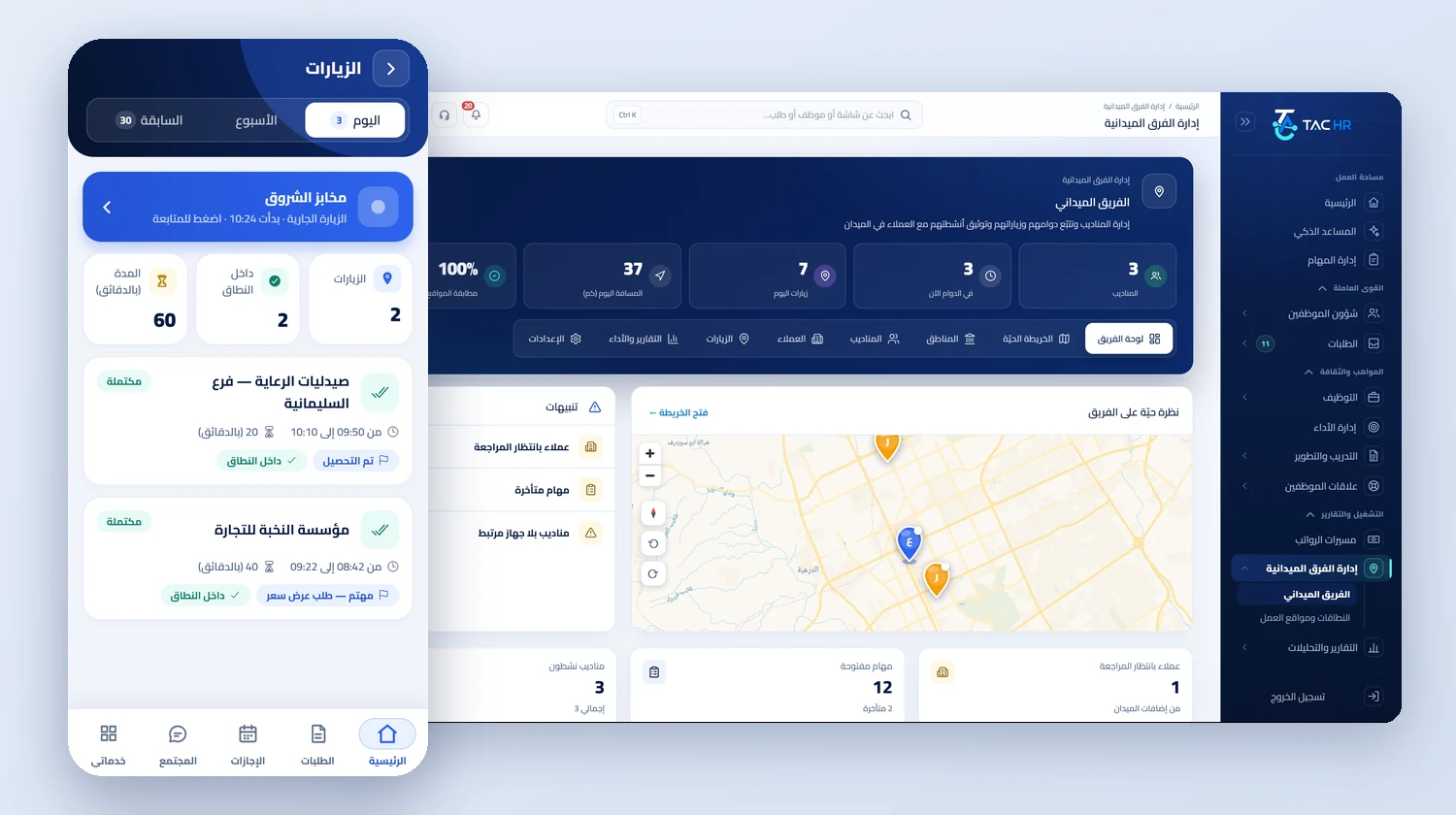
The field team dashboard with the number of reps on shift now, today's visits, distance and location match, a live map of the reps' positions and review alerts, next to the «Visits» screen of the rep app with the current visit and today's completed visits
From the phone

One app for the rep and the employee

The rep opens the same employee app to punch in, file requests and see the payslip, and with it come the field screens: their customers, visit check-in, activities, field tasks, areas and the day summary. Only the system decides who is a rep.

  • A four-language interface: Arabic, English, Urdu and Hindi
  • Field screens appear for employees whose tracking is switched on in their file, within the rep seats of the subscription
  • Phone notifications for an assigned area, an area window about to end, and leaving the area if your company turns it on
See the employee app

What the app opens for the rep

On top of the employee screens, for employees with field tracking on

  • Customers
  • Visits
  • Field tasks
  • My areas
  • Day summary
  • Punch and requests
The flow

How the process runs end to end

  1. 01

    Activate

    An employee becomes a rep within the seats, plus the visit boundary, activity types and the area-exit alert

  2. 02

    Assign

    Customers and their approved sites, drawn areas assigned to reps with time windows, and field tasks

  3. 03

    Work the field

    A punch starts the shift, tracking runs during it, visits are placed by the system, with activities and photos

  4. 04

    Review

    The live map and route, approving customers and areas, and the reports and attendance sheet payroll reads

After rollout

What actually changes

Every figure in this section is a setting or a limit configured in the system. The effect on your company is something you measure after rollout.

150 metres
The supervisor knows which visits really happened at the customer, because each visit carries its distance against a boundary set between 20 and 2,000 metres, 150 by default
10 seconds
The supervisor sees each rep on shift on Android at a position no more than about 10 seconds behind the street, and no location is sent outside the shift
50%
The manager is alerted when an area window ends with visit coverage below 50%, and the rep a day before it ends if it is incomplete
11 activities
The rep records one of 11 ready activities with its fields at the customer, such as a quote value or a collection method, so the supervisor gets more than free text
90 days
The raw route trail is kept for 90 days to review any day, and an approved area's figures are frozen so they never change afterwards
500 metres
When your company turns the alert on, the rep is alerted on the phone after moving more than 500 metres from the area for more than 10 minutes

Limits of this service

The field shift cannot start, and neither a punch nor a visit can be recorded, without an internet connection. A rep is never tracked outside the shift: nothing before check-in or after check-out is sent. Verifying a visit needs an approved customer location, and a customer with no location, or with one not yet approved, has visits recorded without a verdict. Location accuracy comes from the phone itself, so a weak reading leaves the visit «unconfirmed» and it does not count as inside. The capture rhythm described (every 5 seconds, sent within 10) is the Android app's; iPhone captures by distance travelled and sends every 30 seconds. The area-exit alert runs on the rep's device only and reaches the rep, not the supervisor, and it stays off until your company turns it on. Active reps can never exceed the subscription's seats. Activities are records, not accounting: a collection or a quote never becomes a ledger entry or an invoice.

Try rep tracking on your own team and customers

We set the demo up on your reps, customers and areas, and walk through a full rep day from the start of the shift to the evening report.